Introdução
Note that this is a teardown, so reversing this process is either very diffiuclt or impossible. Only proceed if you have no desire to reasemble the device afterwards.
Ferramentas


-
-
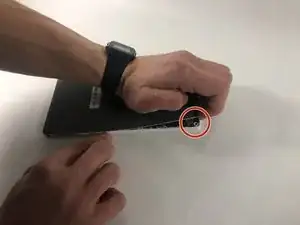
Peel the back cover off of the Kobo Arc by finding the lip in the cover and pulling back on it.
-
-
-
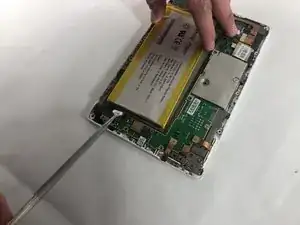
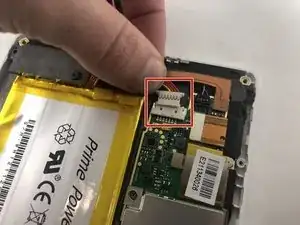
Unplug the battery connector from the rest of the tablet.
-
Remove the battery from the tablet.
-
-
-
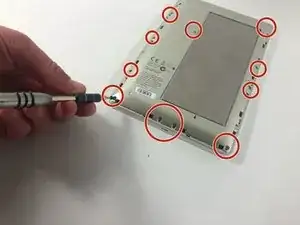
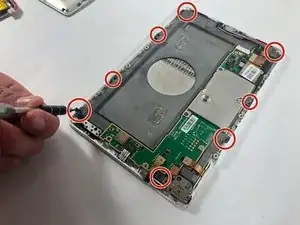
Remove the screws that are attached to the grey plastic layer.
-
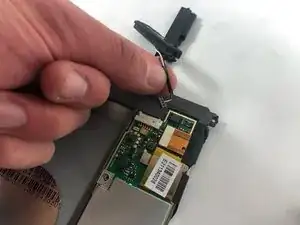
Remove the gray plastic layer.
-
-
-
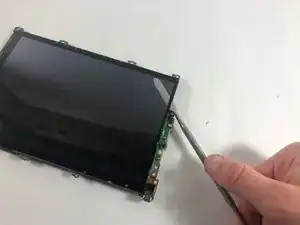
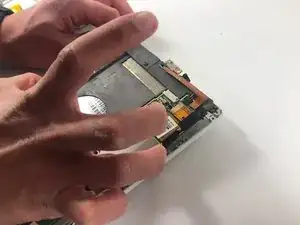
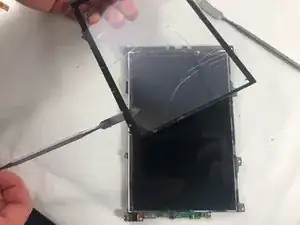
Wedge a nylon spudger between the screen and the tablet.
-
Slide the spudger around the edges of the screen and remove it from the device.
-
To reassemble your device, follow these instructions in reverse order.

3 comentários
Hi, what is the part number for the screen?
Toryy -
is there any the software reset boot looking error not Wi-Fi, type doing manual software relish, software find on the kobo, page on the way back machine, but version same old the I think coursing all the problems Have already?
D H -
Where did you find the replacement screen? I've been looking all over the internet for a replacement and the ones I fixit has arent for the arc??? Someone help a poor guy out I'm lost