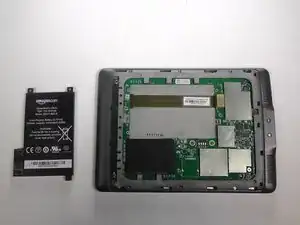
Introdução
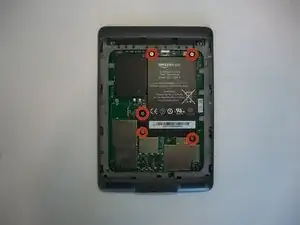
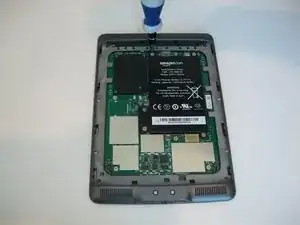
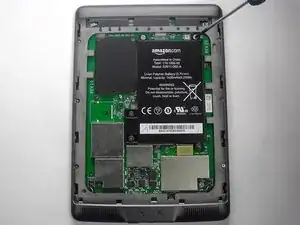
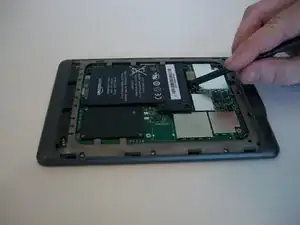
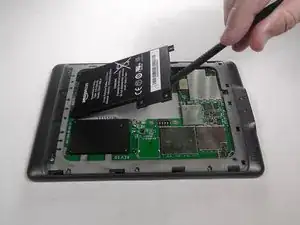
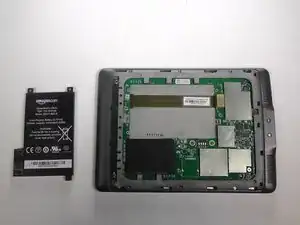
Use this guide to replace an old or faulty Amazon Kindle Touch battery. The battery may be due for replacement if your Kindle runs out of power quickly, won’t work unless plugged in, or won’t charge.
Make sure the device is powered off and disconnected from all external power sources before beginning this process. Please dispose of electronic waste responsibly.
Ferramentas


-
-
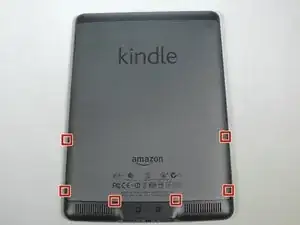
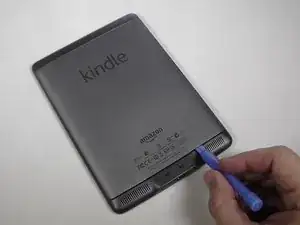
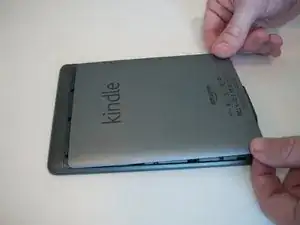
Use the plastic opening tool to undo the six plastic clips around the bottom of the back panel of the Kindle.
-
-
-
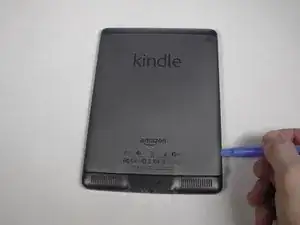
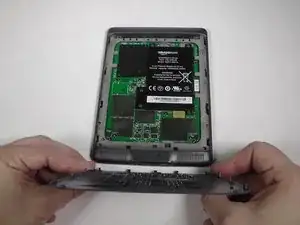
Slide the back panel downward, toward the charging port. This will release the clips on the top half.
-
Once the top clips release, gently lift the back panel away.
-
To reassemble your device, follow these instructions in reverse order.

2 comentários
Where can I buy a new battery?
I tried this, but my Kindle still wouldn't work so it must not have been the battery. I'm happy to mail the new battery and the tools that came with it to whoever needs them if shipping isn't too expensive from California. Reach me at meldmb9-at-hotmail-dot-com subject line "kindle battery".
Wear work gloves as the tool can easily slip and stab you in the hand.
BRUCE -
The clips aren't all the same; the side clips are slide-locks rather than press-locks.
Use the Opening Tool to unclip the clips along the bottom edge. This will allow the lid to slide towards the top, releasing the side clips and allowing the lid to be lifted off.
When reassembling, slide the lid upwards while pressing the sides to re-engage the side clips, then press the bottom edge to lock it into place.
jimf -