Introdução
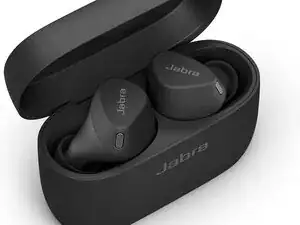
This technique guide covers the correct setup, daily handling, and basic maintenance for Jabra Elite 3 in-ear earbuds. Following these steps helps prevent charging issues, connection drops, and audio imbalance. For full button controls, LED indicators, and factory reset details, the official user manual is available through Manualslibraryy.
Step 1 — First-Time Setup
- Fully charge the case and earbuds before use.
- Remove earbuds to power them on automatically.
- Enable Bluetooth on your phone.
- Select “Jabra Elite 3” from available devices.
Step 2 — Fit & Audio Performance
- Try different ear tip sizes for a secure seal.
- Proper fit improves bass and call quality.
- Avoid loose fitting, which causes dropouts.
- Re-seat earbuds if audio sounds uneven.
Step 3 — Charging & Battery Care
- Store earbuds in the case when not in use.
- Clean charging contacts regularly.
- Avoid charging in extreme heat or cold.
- Use only certified USB power sources.
Step 4 — Cleaning & Hygiene
- Wipe earbuds after workouts or long sessions.
- Clean ear tips separately if buildup appears.
- Keep speaker mesh free of wax or dust.
- Never rinse earbuds under running water.
Step 5 — Button & Connection Tips
- Use physical buttons gently to avoid wear.
- Restart earbuds if pairing becomes unstable.
- Re-pair if one earbud stops responding.
- Reset only when troubleshooting fails.
Common Issues Prevented
- One earbud not charging
- Bluetooth disconnects
- Low or muffled sound
- Shortened battery lifespan
Detailed reset steps, LED meanings, and button shortcuts can be found in the official manual hosted on Manualslibraryy.
Conclusion
With correct setup and simple care routines, Jabra Elite 3 earbuds remain reliable for daily use. These preventative techniques reduce common failures and help maintain consistent audio and battery performance.
Conclusão
To reassemble your device, follow these instructions in reverse order.

0 comentários