Introdução
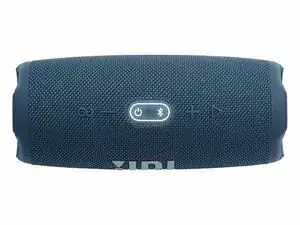
The JBL Charge 5 is a rugged portable Bluetooth speaker known for its durability and powerful sound. However, common issues such as charging failure, distorted audio, faulty buttons, or connectivity problems can occur after extended use.
This guide walks you through safe techniques to inspect, open, and service the speaker’s major components.
For additional technical references, you may review the model documentation available on manualslibraryy.com.
Step 1 — Power & Safety Check
- Turn off the speaker and disconnect any charging cable.
- If the device recently overheated, let it cool before opening.
- Wipe off moisture or debris to prevent damage during disassembly.
Step 2 — Remove the End Caps
- Use a plastic pry tool to gently separate the rubberised end caps.
- Work slowly around the edges—JBL uses strong adhesive, so steady pressure helps.
- Set the end caps aside once both sides are free.
Step 3 — Unscrew the Housing
- Using a Torx T6 or T8 driver, remove the screws holding the external shell together.
- Keep screws organised as lengths vary.
- Slide the outer panel away to reveal the internal components.
Step 4 — Disconnect the Battery
- Before touching any internal part, locate the battery plug.
- Use a spudger to disconnect the battery connector from the motherboard.
- Inspect the battery for swelling, leakage, or a burnt smell.
- If damaged, stop and replace the battery before continuing.
Step 5 — Inspect the Charging Port
- Common issue: Charge 5 not charging or charging intermittently
- Locate the USB-C port module.
- Check for debris—clean gently with a dry brush.
- Look for broken solder joints or bent pins.
- If the port wiggles loosely, it may need resoldering or replacement.
Step 6 — Check the Passive Radiators
- Common issue: Buzzing or rattling sound
- Inspect both side passive radiators for tears.
- Ensure each radiator is firmly seated and screws are tight.
- Loose radiators can cause distortion; tighten carefully.
Step 7 — Clean the Buttons and Contacts
- Common issue: Power or Bluetooth button not responding
- Gently remove the rubber button strip.
- Clean the underlying contacts with a cotton swab dipped in isopropyl alcohol.
- Reinstall once dry.
Step 8 — Speaker Driver Check
- Common issue: Distorted audio or no sound
- Inspect the main driver for visible damage.
- Check its connectors to ensure no wires have loosened.
- If the driver looks burned or torn, it may need replacement.
Step 9 — Reassemble the Unit
- Reconnect the battery.
- Carefully close the housing and reinstall all Torx screws.
- Reattach the end caps by pressing them firmly back into place.
- Test the speaker before fully securing the final components.
With these techniques, you can address the most common faults on the JBL Charge 5, including charging problems, distorted sound, or stuck buttons.
If you need reference specs or model documentation while repairing, you can look up JBL Charge 5 resources on manualslibraryy.com.
This guide helps extend the lifespan of your speaker, reduces electronic waste, and supports self-repair—exactly what iFixit is all about.

0 comentários