Introdução

  1. cdECCToYdPjNOvuv
    cdECCToYdPjNOvuv
    ekHxk2uZXmiDiyx1
    1WV5texJmVRaBmoH
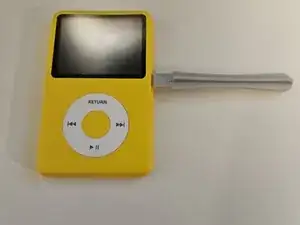
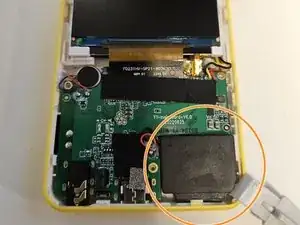
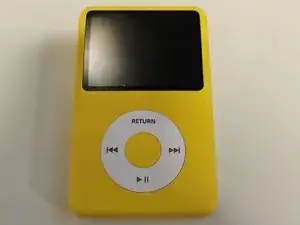
    • Use a pry tool and start half way up the left or right side of the MP3 player, working your way around the edge

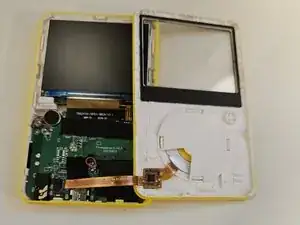
    • Carefully lift the cover off and detach the connecting cable

    How do you detach the ribbon cable?

    Dave Connolly -

  2. kOeDMBLfhZySkdWF
    kOeDMBLfhZySkdWF
    4HGeBwuKbLXZB63X
    yTqtDZTyucKoCLD4
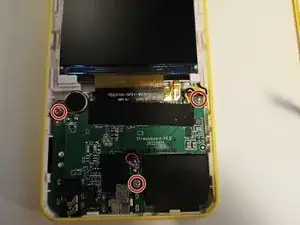
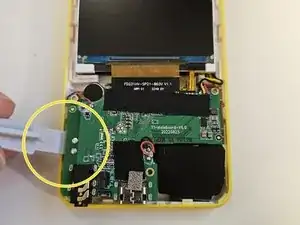
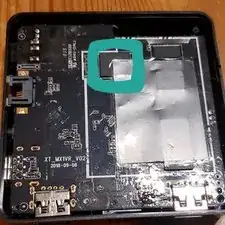
    • Remove the 3 screws with a Philips #00

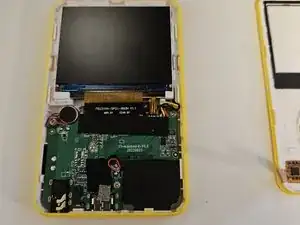
    • Carefully remove the Speaker from its clasps with a pry tool

    • Carefully lift the board on the left side with the pry tool

  3. DKxAmq4ivsRFncaA
    DKxAmq4ivsRFncaA
    ZCjWZ2fxCEnp1pJk
    jjaqNvEeBmlQIyG1
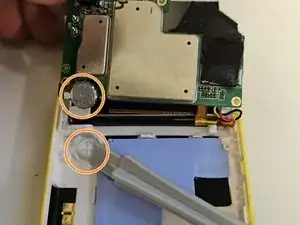
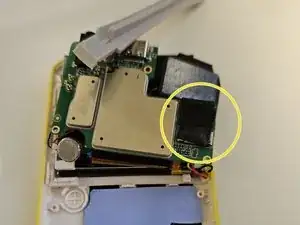
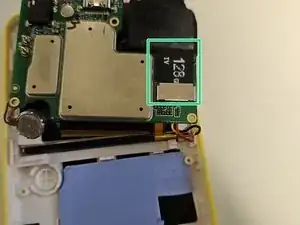
    • Carefully Lift the board up and towards the screen. You may need to lightly pry the battery out of its socket

    • Remove the tape

    • Slide the Micro SD card out of the socket

Conclusão

To reassemble your device, follow these instructions in reverse order.
Dan

Membro desde: 19/02/19

5054 Reputação

17 comentários

Tired of waiting for a reaction to my questions above I bought a Samsung 512GB Micro SD Evo Plus UHS-I U3 SDcard. Maybe overkill, but very fast. the replacement of the card was a 5 minutes job. Now I am copying the contents of the old 128GB card to the Innioasis Y3 which will take hours I guess. I let everyone know if it all works fine.

P. Reuvers -

It works great. Only one small issue. The Innioasis Y1 shows that it contain 128GB, But he shows the correct used and available space, at this moment I used 143GB of the 512GB, more then the original Innioasis Y1.

P. Reuvers -

Any suggestion on how to format the SD Card? thanks

Paninaro -

Will this work with an ExFAT format card or just FAT32? Thanks

jjedwards894 -

ExFAT worked fine for me.

Tanner Mills -

Thanks Bud! Worked great. Getting the case open was trickier than I expected. Otherwise it's even easier once the screws are out of the motherboard, both the screen and the board move easily out of the clips. I put in a 512GB San Disk and copied the folder structure. Now to transfer my content. Again Thanks so much. I made a 1/2TB iPod for under $100 and it has bluetooth!

Matty -

I'm not able to remove the speaker. I'm using a prying tool but don't know where to insert properly.

tr11ggered -

Hi everyone,
I recently opened up the device in order to extract the card, format it and clean up every errors that the computer said the card had. I then re-copied all my music and it works very fine and much better than ever before. BUT, each time the device either runs out of battery or is switched off, when it restarts it says files are either broken or the card is not ready - leading to not being able to read and play my music :-(
ONLY when I remove the card and re-put it back physically in the device, Y1 then starts scanning the music and finds it and all good. However, it's very much not convenient as it requires opening up the device each time.. Simply plugging the device to the computer and unplugging it does not help nor trigger the scanning for music.
Any idea how to forcefully trigger the scanning of music by the device? I am hopeless now and Innioasis company says it's built to scan automatically and therefore can't help more..
Thank you for any help, please!

Ced -

Have you tried the alternative Rockbox firmware? The database on Rockbox is manually triggered via a menu in the settings. This allows for rescanning the library anytime on demand.

zandengoff -

Has anyone else had issues with sound after replacing? I was extremely gentle, everything looks identical as before, wire positions and all, connections are still secure, nothings clipped or twisted, except there is now a static anytime I play anything through the speakers.

Andy H. -

If I load music on it before putting in a larger microsd, will I have to transfer all my files again? or does the player have root storage besides it’s original sd card?

Kelly -

I don't think it has root storage, I had to transfer files back to it when changing my SD card

Tony -

I followed the guide and was successful two times with both Y1 devices. However on the second device it failed to start up until I plugged it into my laptop. Maybe the battery terminal was loose or had a bad connection when I put it back together?

Tony -

Unsure if this guide is just incomplete and modestly inaccurate, or if assembly has changed on the Y1.

On mine -

The housing is not at all easy to pop apart, and pointing at the intact device with a pry tool does not help much. I found it much easier to start where the housing is more flexible - on the top third of the device, by the screen.

The speaker is stuck in place with double-sided tape on the back, there are no physical clasps that secure it. If gently pried straight up from underneath, the adhesive seems reusable, once or twice.

The tiny silver disc - the vibration motor, not a battery - is also stuck in place with double-sided tape, no physical mounts. Its adhesive seems reusable as well, if gently pried from underneath, but as the housing wedges it in place, that's less important.

It should be noted that the board has to shift towards the screen before it can move 'up' much, as the 3.5mm socket slots into the lower edge of the housing.

Eridyne -

1tb Works well, downloaded a 700GB collection of TV series in MP4 format

Vlad Vlad -

Excelente, me fue muy útil. Gracias.

Kara Sanz -

I just opened up mine today. I found that a guitar pick worked best for me. It is definately a tight press fit, but if you go slowly and don't be too forceful, it will come apart. On mine, the center screw was hidden beneath a piece of tape that I gently moved aside. As others point out, there are no "clips" holding the speaker, just double sided tape. I did not remove any ribbon cables. I carefully moved the faceplate while leaving the ribbon attached. Make sure you do this in a clean, dust free area with good lighting. I managed to get a fingerprint inside the clear area, so I'll take apart again and clean carefully.

RonO -