Introdução

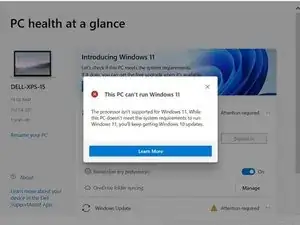
With the release of Windows 11, Microsoft has imposed certain requirements for hardware compatibility, including the need for TPM 2.0, specific CPU architectures, and a minimum amount of RAM. However, not all users may have hardware that meets these requirements, or they may simply want to bypass these checks for other reasons.

That's where Rufus comes in. Rufus is a popular tool that can create bootable USB flash drives from ISO images, and it also offers various customization options, including the ability to bypass certain installation checks for Windows 11. In this guide, we'll walk you through the steps of using Rufus to create a bootable USB flash drive that will allow you to install Windows 11 without the need for TPM, CPU, and RAM checks, as well as online signups.

Disclaimer

Before we proceed with the guide, it's important to note that while it is possible to bypass the hardware requirements for installing Windows 11 using Rufus, it does not guarantee optimal performance on underpowered hardware. Windows 11 is designed to take advantage of the latest hardware technologies, and running it on older or underpowered hardware may result in slower performance, crashes, or other issues.

Changes made

Below you can see the changes Rufus will make to the registry of the installation media.


Windows Registry Editor Version 5.00


[HKEY_LOCAL_MACHINE\SYSTEM\Setup\MoSetup]

"AllowUpgradesWithUnsupportedTPMOrCPU"=dword:00000001


[HKEY_LOCAL_MACHINE\SYSTEM\Setup\LabConfig]

"BypassTPMCheck"=dword:00000001

"BypassSecureBootCheck"=dword:00000001

"BypassRAMCheck"=dword:00000001

"BypassStorageCheck"=dword:00000001

"BypassCPUCheck"=dword:00000001

  1. wIyiaGhb2QjgS3PP
    wIyiaGhb2QjgS3PP
    xPtTNCQFw1JVtDWj
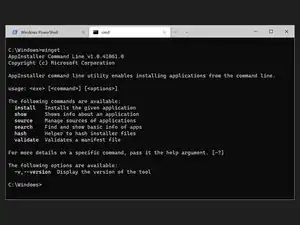
    • Launch the windows command line interface.

    • Enter winget install Rufus.Rufus to install Rufus.

    • Restart the terminal application and launch Rufus by typing rufus.

    • If you are running a version of Windows older than Windows 10 1709 (build 16299) or it didn't work for any other reason, you'll need to manually download Rufus from the GitHub.

  2. JjNDDEGAG6tNEsGD
    JjNDDEGAG6tNEsGD
    ec2jfCCSpybIhIqK
  3. ORFW6dChVCNTILGX
    • Plug in a USB flash drive with a capacity of at least 8GB.

    • Any content on the flash drive will be deleted.

  4. UHT16YwsPMGeaBO1
    UHT16YwsPMGeaBO1
    4pce5qaJsBCukuFQ
    KtxISIyfxGgIJV6Q
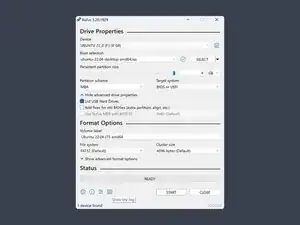
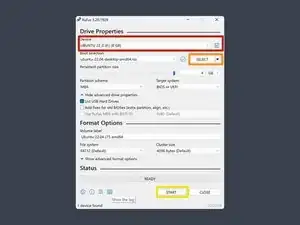
    • Select the flash drive you want to use.

    • Select the ISO image you downloaded.

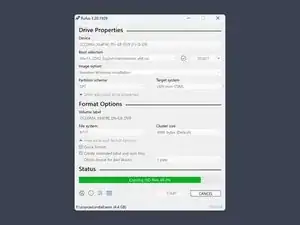
    • Press START.

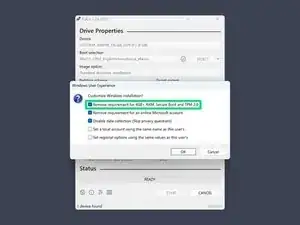
    • Select the option Remove requirement for 4gb+ RAM, Secure Boot, and TPM 2.0 and confirm with OK.

    • Here you can also set other options, like to automatically opt out of data collection, or remove the requirement for a Microsoft account on setup.

  5. jVQeQGptpIGO5DUS
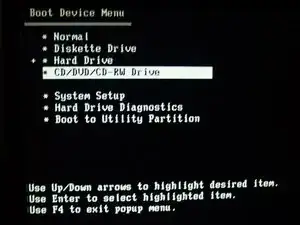
    • Boot from the USB flash drive by rebooting your PC while pressing the key that opens the boot-device selection menu.

    • This will vary from device to device, but typically Enter, Esc, F10 or F12 are a good starting point.

    • Select the option that boots the PC from the USB flash drive.

    • This will typically be called something along the lines of USB: Mass Storage.

    • Some devices, like the Microsoft Surface tablets, don’t use a menu and just directly boot from USB when p. ex. the Volume-Down button is pressed while turning the device on.

  6. TklGognyZy5orB6R
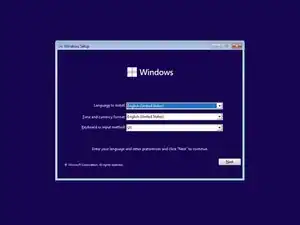
    • Follow the instructions to install Windows.

    Hat super funktioniert. Danke. :) Dr. W. Güntermann

    Dr. Werner Guentermann -

  7. R2UNTYm5k3GR2GBV
    • Remove the USB flash drive.

    • Remember to reset your boot priority if you had to change it on step 5.

    Mooie uitleg . Helaas lukt het mij niet om op deze manier windows 11 opnieuw te installeren op een nieuwe ssd schijf .

    Hennie -

    Not mentioned, but can also use the Rufus modified installer to upgrade an existing Windows 10 install saving all files/programs/settings.

    mpaint -

    That's a crucial addition that you added, mpaint. The article should be updated.

    Fixit User -

    ...cont/d

    If you could give us some pointers to that variant it would be welcome.

    Fixit User -

    [within the 5 minute limit ..but no]

    ...cont/d

    Ahha! I asked Chat GPT: Is there a variant of a Rufus modified installer to upgrade an existing Windows 10 install saving all files/programs/settings?

    ..and it's all there.

    Just use Rufus to create a bootable USB memory stick as per normal - BUT DON'T BOOT FROM IT.

    Apparently, just run setup on the stick from within Windows, presumably in an administrator's account. All preserved ..we hope.

    Fixit User -

    Je zou ook eventueel Linux kunnen overwegen.heb zelf Ubuntu 24.6 en deze is zeer stabiel,snel en veilig.

    Frans

    frans van corven -

Conclusão

Have fun!

Sebastian

Membro desde: 19/08/18

32352 Reputação

12 comentários

Merci pour ce tuto. Windows 11 installé à partir de l'ISO téléchargée chez Microsoft fonctionnera-t-il indéfiniment ? Ou faut-il ensuite acheter une clé de validation ? Merci.

Rob -

Les clés de validation de Windows sont liées à votre compte Microsoft ou à votre appareil. Si vous possédez déjà une clé Windows 10, elle devrait s'activer automatiquement. Si vous n'en avez pas et que vous êtes satisfait de ne pas personnaliser l'apparence de votre système, vous pouvez l'utiliser sans l'activer, car Microsoft est devenu moins strict en ce qui concerne l'obligation d'une clé. Cependant, un petit filigrane apparaîtra dans le coin de l'écran, vous demandant d'activer Windows à un moment donné.

Sebastian -

Merci beaucoup pour ce tutoriel. Mais, je ne parviens pas à faire en sorte que ma clé USB soit bootable. En fait, la plupart des tutos, il est indiqué "Personnaliser l'installation de Windows" :

1. Supprimer la nécessité d'avoir 4 Go de RAM, Secure Boot et TPM 2.0

2. Supprimer la nécessité d'avoir un compte utilisateur Microsoft en ligne

Ce qui est surprenant, c'est que Rufus efface toutes les données de la clé USB, qui ne garde que l'icône de l'application Rufus. Lorsque Windows 11 est téléchargé sur la même clé USB, celle-ci n'est plus bootable.

Michel BERNARD -

Est-ce une mise-à-jour ou bien une nouvelle install et faut-il sauvegarder le bureau pour retrouver tout ce qui se trouvait sur le bureau de W10 ? Merci

Pascal Vigeant -

Very good tip, thx.

FrederPower -

Ok, cool guide, but is it possible to upgrade directly from Win 10 to Win 11 without losing any data? Or just works with a clean install?

AlexPanaitStart -

The same question from me....

TTF -

Bonjour, faut vous supprimiez windows 11, pour passer a windows 11 pro car la version pro est offerte pendant 3 mois, passer ce délai, windows 11 pro sera de nouveau payant d'un prix au delà de 70 euros, donc vous avez 3 mois offert pour l'installer et profitez de son intégralité, sinon il vous sera obligatoire de dépenser plus de 70 euros, cela serais bête, faite ce que je dit, et vous pourrez profiter de l'intégralité de windows 11 pro.

Colombe Colombe -

Click on how to install Linux. Get sent to How to Install windows 11. Awesome

Dawn OBrien -

Thanks for the decriptive guide. I will install linux and forget about windows 10.

Atma S -

look at the original-post : https://www.deskmodder.de/wiki/index.php...

Part: "Windows 11 ohne TPM und SecureBoot neu installieren - Die Vorbereitung"

Save script as "win11-bypass.reg", to import it everywhere.

Helfer Honorary -

The system doesn't accept regular updates after upgrading to win11 on a pc that didn't qualify for upgrade. Is there a solution other than moving to Linux?

Jos Santos -