Introdução
Your GE Ultrafast Combo Washer Dryer stores detailed information whenever it detects a problem. By accessing its hidden diagnostic modes you can read consumer help messages, view and clear stored fault codes, and run internal service tests that operate individual valves motors and sensors. These tools let you confirm simple issues before calling for service, decide whether a warranty repair is needed, or gather solid information for a technician.
-
-
Consumer help indicators appear with yellow red or uncolored backgrounds when the washer detects an issue.
-
After correcting the cause you can start a new cycle normally.
-
-
-
Plug the appliance into a working outlet and confirm no cycle is running.
-
Press Power to turn the display off so the screen is dark but the unit remains energized.
-
-
-
Press and hold Start / Pause for about ten seconds with the screen off.
-
Release the button when the fault code list appears on the display.
-
-
-
Use the Up or Down arrow keys to move through the stored fault codes.
-
The list shows the most recent faults saved during past cycles.
-
-
-
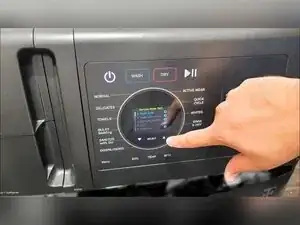
With the screen off press and hold Pause / Start Smart Dispense and Timed Dry together for roughly five seconds.
-
Release the buttons when the circular UI lights up and the service test menu appears.
-
-
-
Press the Up or Down arrows to highlight a test in blue.
-
Press Select to open the chosen test menu.
-
If sub-options appear pick one and press Start to begin the test.
-
-
-
Watch the display for live readings while the test runs.
-
Press Select to stop the active test and follow any on-screen prompts.
-
-
-
From the service menu highlight Test 13 Clear Fault Codes and press Select.
-
Follow the on-screen prompt then press and hold as instructed until the display confirms the memory is cleared.
-
You now know how to view consumer help alerts, read and clear stored fault codes, and run targeted service tests on your GE Combo Washer Dryer. Always document any findings before making changes and consult GE or a qualified technician whenever the machine is under warranty or a fault remains unclear.
