Introdução
If your Samsung French-door refrigerator is flashing an error code and the interface panel won’t respond, you can often restore normal operation by entering diagnostic mode. This guide also shows how to enter the refrigerator’s forced service modes (including forced defrost) to help troubleshoot cooling and defrost problems, and how to turn off OF “demo mode,” which shuts off the compressor. This was filmed on a Samsung French-door refrigerator with a similar-style interface panel, and other models may have minor differences.
Ferramentas

-
-
Look for an error code flashing on the interface panel, such as 14E, and check whether the buttons are unresponsive.
-
-
-
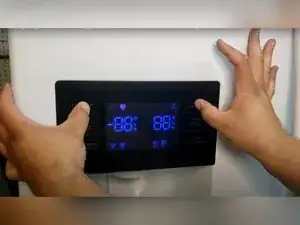
Press the top left and top right buttons at the same time, and hold them for about eight seconds.
-
Listen for a beep to confirm the refrigerator entered diagnostic mode.
-
Wait about 30 seconds for the refrigerator to run internal processes and restore normal button function.
-
-
-
Check the front door interface panel for error codes before or during diagnostics.
-
Check the computer board on the back of the refrigerator for additional codes shown as a pattern of red flashes.
-
-
-
Press and hold the upper left and middle right buttons for about eight seconds.
-
Listen for a beep to confirm the refrigerator entered forced service mode.
-
Listen for constant beeping to confirm the refrigerator is still in forced service mode.
-
-
-
Press any button to cycle through the available forced mode options.
-
Stop on the command you want, and leave the display on that selection to start the mode.
-
Wait for the mode to begin running, which should happen almost immediately.
-
-
-
Press and hold the same forced-mode button combination again to re-enter the forced system.
-
Confirm the display returns to the mode currently running, such as FD (forced defrost).
-
-
-
Cycle through the forced-mode options until you reach the totally blank screen option after the FD display.
-
Leave the display on the blank option, and wait about eight seconds.
-
Confirm the beeping stops and the refrigerator returns to normal operation.
-
-
-
Identify OF on the display, which indicates demo mode that shuts off the compressor while the interface panel still works.
-
Press and hold the upper left and middle left buttons for about eight seconds to clear OF.
-
Confirm demo mode is off and the refrigerator is back to normal.
-
-
-
Use diagnostic mode to clear lockout-style errors and restore button control when possible.
-
Use forced service modes to help troubleshoot cooling and defrost system behavior.
-
If an error code clears after entering diagnostic mode, the refrigerator should restore normal button function after about 30 seconds. Don’t leave forced service mode running, and always exit it by selecting the blank option after FD and waiting for the beeping to stop. If an error code won’t clear and continues to display, the video notes there may be a larger underlying problem that requires further diagnosis.
