Introdução
Is your HP Spectre x360 13-aw0xxx not maintaining power and dying quickly? If so use this guide to help you replace your battery step by step. You will need two opening tools, a Phillips #00 screwdriver, and a T5 Torx screwdriver to complete this replacement.


-
-
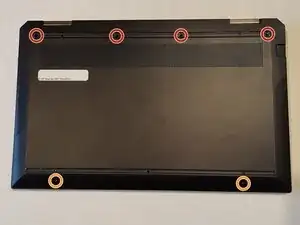
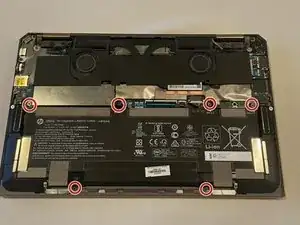
Remove the following screws securing the lower case:
-
Four 6 mm Phillips #00 screws
-
Two 3 mm T5 Torx screws
-
-
-
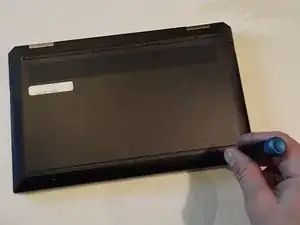
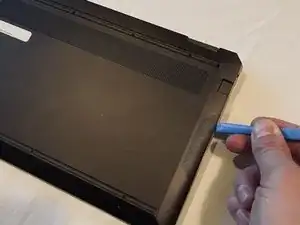
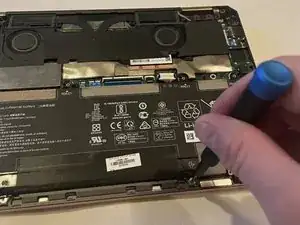
Insert an opening tool in the seam between the lower case and chassis.
-
Pry around the perimeter until the lower case fully releases.
-
Remove the lower case.
-
-
-
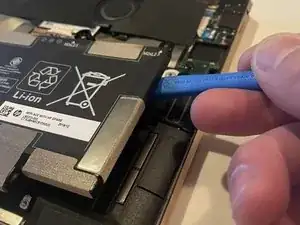
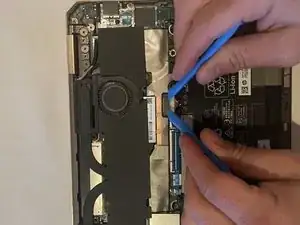
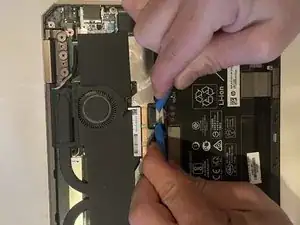
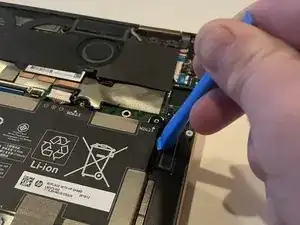
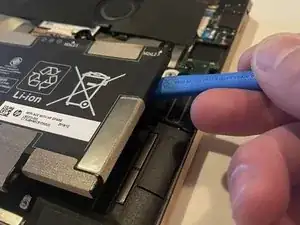
Use two opening tools, one on either side of the battery plug, to slowly pull the plug straight out of its port.
-
To reassemble your device, follow these instructions in reverse order.

2 comentários
I just replaced the battery using the ifixit battery mentioned here. Everything was working fine until I realized that my laptop shut down, the battery ran out in about 1 hour and the BIOS screen said that a non-hp battery has been detected.
I installed this battery and my laptop would no longer boot up. Uninstalled and it worked find with power cord. I have no re-installed my old battery and the laptop works again. Something not quite right in there. I'm out $120 and a lesson learned... don't buy from ifixit
David B -
There are no screws under the rubber indicated for two T5 Torx screws, those are just the exposed ones beside it.
FlyingLobster69 -