Introdução
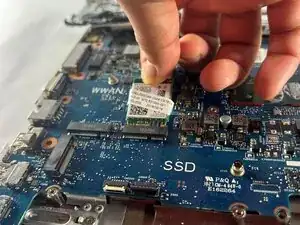
The HP Probook 640 G4 is a business class 14 inch laptop that is designed for durability. This guide will walk you through how to safely replace the Wifi card. A failing Wifi card can cause weak wireless connections, failing bluetooth, and slow speeds.
Before you start be sure to power the laptop off completely, unplug the AC adapter, and remove all external devices. Work on a clean flat surface. Make sure you have all of the right tools and parts available.
If Wifi still doesn't appear after replacement, unplug and plug the new card back in. Make sure to confirm the battery is connected as well.


-
-
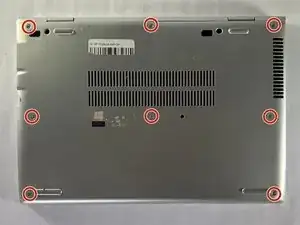
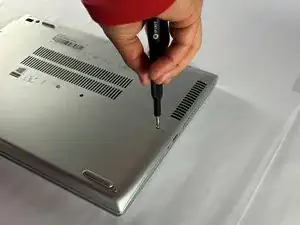
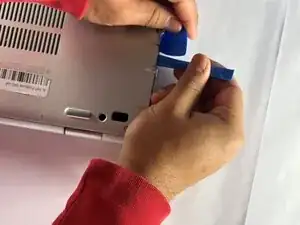
Insert an opening pick into the seam between the lower case and chassis, and twist it to create a gap.
-
Insert an opening tool into the gap.
-
Use the opening tool to pry around the entire perimeter of the device until the lower case fully releases.
-
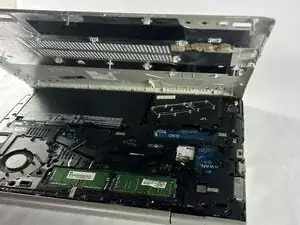
Remove the lower case.
-
-
-
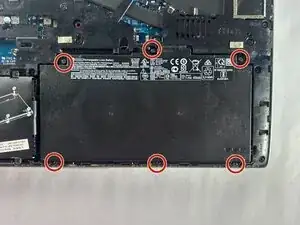
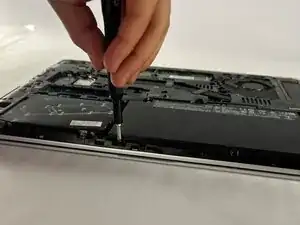
Use a Phillips screwdriver to loosen the six 2.5 mm-long captive screws securing the battery.
-
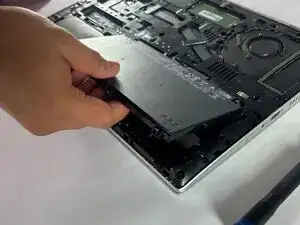
Slide and lift the battery out.
-
-
-
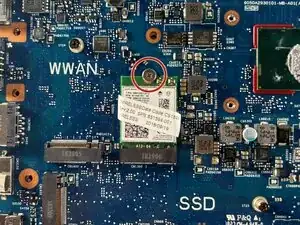
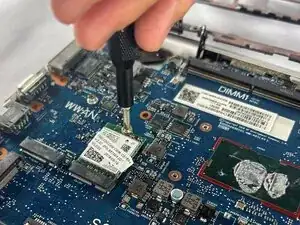
Remove the single 2.5 mm-long Phillips screw securing the Wi-Fi card.
-
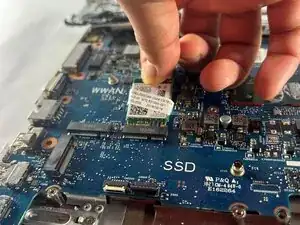
Remove the Wi-Fi card.
-
To reassemble your device, follow the above steps in reverse order.
Take your e-waste to an R2 or e-Stewards certified recycler.
Repair didn’t go as planned? Try some basic troubleshooting or ask our Answers community for help.
