Introdução
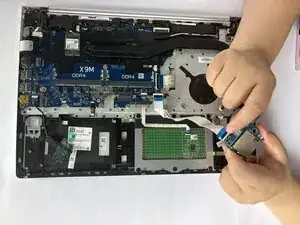
This guide explains how to replace the SD card reader module in the HP ProBook 455 G7 (Model: 7JN02AV). The SD reader is responsible for reading media cards used for storage, file transfer, and camera imports.
You may need to replace this part if your laptop does not recognize SD cards, disconnects frequently, or physically damaged pins are visible. See the “Port or Input Issues” section on the Troubleshooting Page for related symptoms.
Make sure the laptop is powered down and disconnected from power.
Be careful not to bend the SD reader pins or force a misaligned connector into place.
Ferramentas


-
-
Flip the laptop over so the lower case is facing up.
-
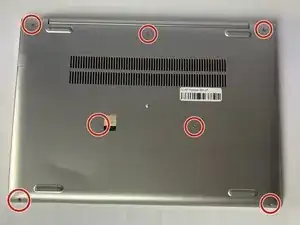
Use a Phillips #1 screwdriver to remove the seven 8 mm-long screws securing the lower case.
-
-
-
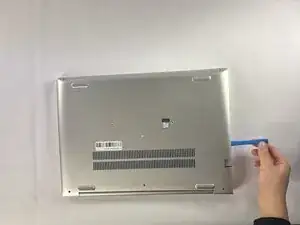
Insert an opening tool into the seam between the lower case and chassis.
-
Pry around the entire perimeter until the lower case fully releases.
-
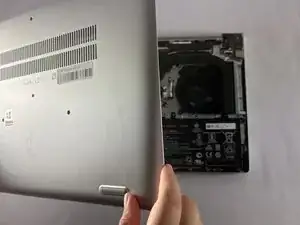
Lift and remove the lower case.
-
-
-
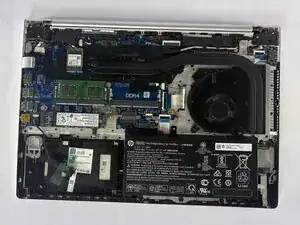
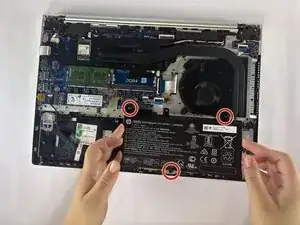
Use a Phillips #1 screwdriver to remove the three 4 mm-long screws securing the battery.
-
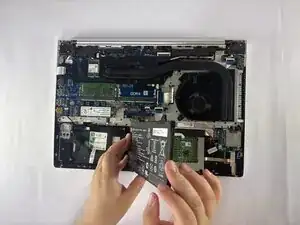
Carefully lift the battery and remove it from the laptop.
-
-
-
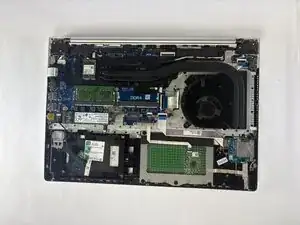
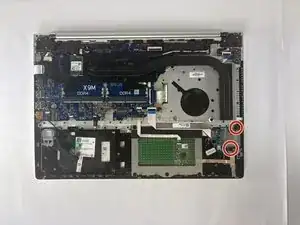
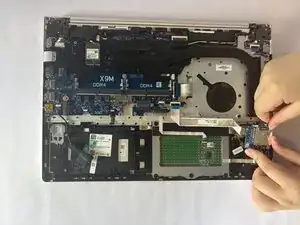
Lift the locking flap on the ribbon cable connector.
-
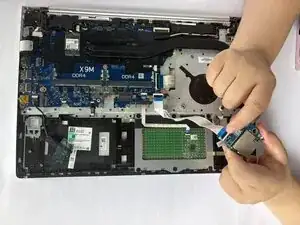
Gently pull the ribbon cable free.
-
Remove the SD card reader board.
-
The SD card reader board has been successfully replaced. Insert an SD card after booting to confirm proper functionality.