Introdução
This guide will show you how to remove your HP Pavilion 15-au123cl Fan successfully. If your laptop is failing to cool its system and is running hot, you may need to replace the fan. Some signs that your computer needs to be fixed are unusual fan noises, unexpected shutdowns, and overheating. This can be caused by dust buildup, mechanical wear, or complete motor failure. Fans can fail while your laptop is still viable; this is an easy fix.
Make sure you have proper protection with an anti-static bracelet. Make sure to flip the computer with the opening facing you.
Ferramentas


-
-
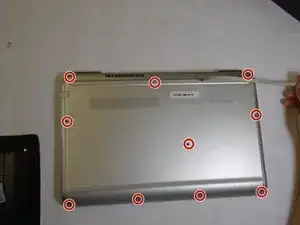
Remove the ten screws from the back case with a Phillips #0 screwdriver.
-
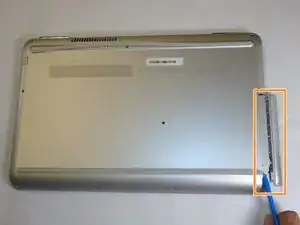
Using a plastic opening tool, pry the CD drive from the computer.
-
Remove the back panel from the computer.
-
-
-
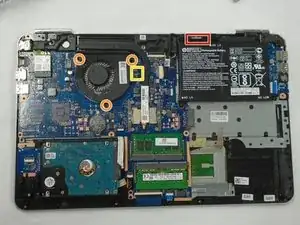
Wearing an anti-static bracelet, disconnect the battery cable from the top of the battery with a spudger or plastic opening tool.
-
Remove the three screws from the fan assembly using a Phillips #0 screwdriver.
-
Gently disconnect the fan cable cable.
-
Remove the fan.
-
To reassemble your device, follow these instructions in reverse order.