Introdução
If your HP EliteBook 840 G4 isn’t holding a charge or won’t turn on without being plugged in, then it could be your battery. The battery is what gives the charge to your device and allows it to hold charge. Without a working battery your device won't function properly.
A good way to test this is to remove bottom cover, disconnect main battery and try to power on using AC only. If stable, replace the battery.
After you've replaced the battery you're going to want to properly dispose of the old battery.
Ferramentas


-
-
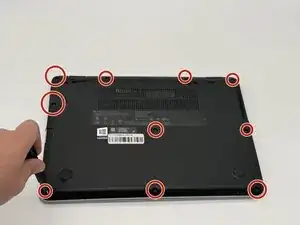
Remove the ten 2 mm screws securing the back panel using a Phillips #0 screwdriver.
-
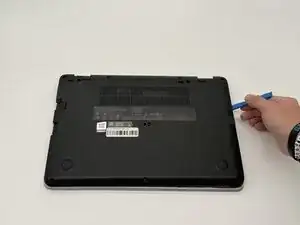
Pry open the sides using an opening tool until you hear clicks.
-
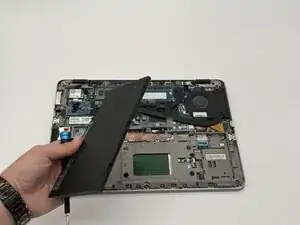
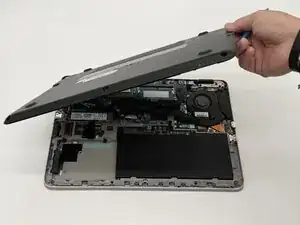
Pop off the back panel and place it to the side.
-
-
-
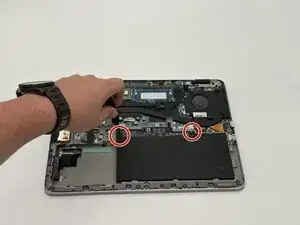
Remove the two 2 mm screws from the battery using a Phillips #0 screwdriver.
-
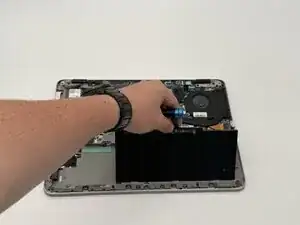
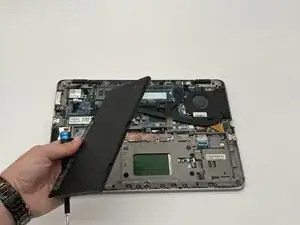
Pull up the tab on the battery to remove it from the device.
-
To reassemble your device, follow these instructions in reverse order.