Introdução

How to replace or upgrade the CPU

  1. nikUTaQ6OUsGduvU
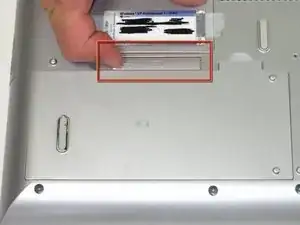
    • Flip the laptop over.

    • Slide the battery release tab to the right to open the battery cover.

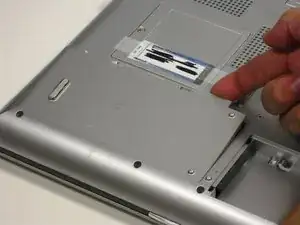
  2. jiNftuGkye63pDDh
    • Remove the battery cover using the tab on the right side.

    • Lift and remove the battery.

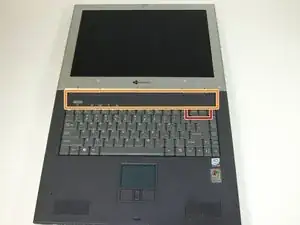
  3. pShVZxdiqvaOuLDa
    • Insert the spudger between the "sysrq" and "ins" keys.

    • Gently pry free the power button panel above the keyboard, from the right and moving to the left.

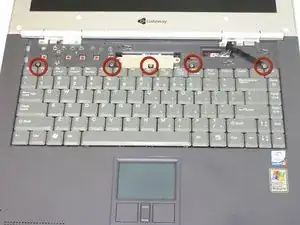
  4. wH4JGHGfLa6p2lfy
    • Remove the five screws holding the keyboard in place.

  5. ehCgaQVbUhqvuncT
    ehCgaQVbUhqvuncT
    NoIcm25K1bPPwJjQ
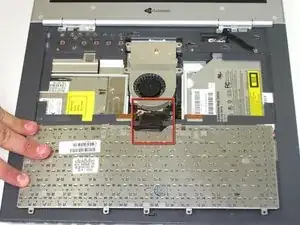
    • Possible device damage: When lifting the keyboard out, do not lift the keyboard up. Only fold back along the space bar edge.

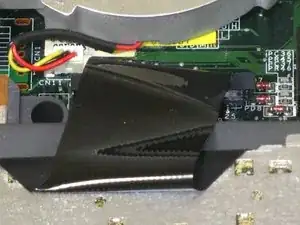
    • Possible device damage: Do not pull the black cable by the ribbon section. Only pull it from the connector itself.

    • Follow the black ribbon cable and gently pull straight up.

  6. GJUuONADFHCpdict
    GJUuONADFHCpdict
    AZYGUAFxnKyCJwfG
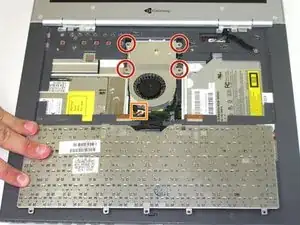
    • Unscrew the four captive screws.

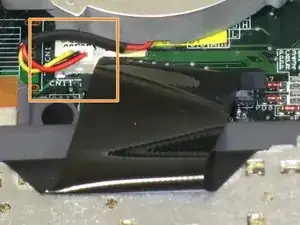
    • Unplug the fan from the system and pull it out. This should slide forward before coming free.

  7. AQFw6YvPK1Fbovji
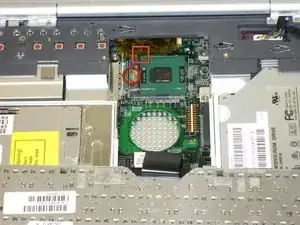
    • Turn screw 1/4 turn to the right.

    • When reinstalling ensure proper orientation the yellow arrow on CPU should be in upper left corner

Conclusão

To reassemble your device, follow these instructions in reverse order.

Elizabeth Mazer

Membro desde: 15/10/10

78 Reputação

0 comentários