Introdução
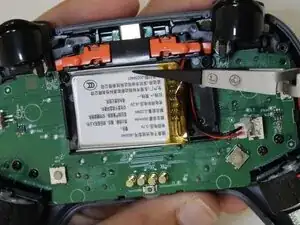
If your GameSir Nova 2 Lite isn’t charging or won’t hold a charge, the battery may need to be replaced. This guide walks you through replacing a faulty or damaged battery.
This is a relatively easy repair, but if you discover a swollen battery after opening the controller, stop and follow the What to do with a swollen battery guide.
Before replacing the battery, check the GameSir Nova 2 Lite Not Charging troubleshooting page. One of the other solutions may resolve the issue without requiring a replacement.
Before you begin, power off the controller.
Ferramentas


-
-
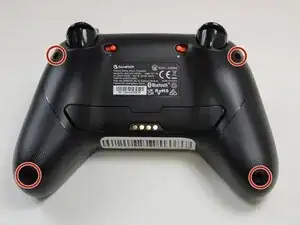
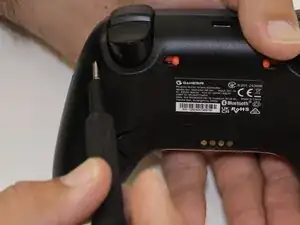
Use a Phillips #0 screwdriver to remove the four 8.5 mm screws from the bottom of the controller's casing.
-
-
-
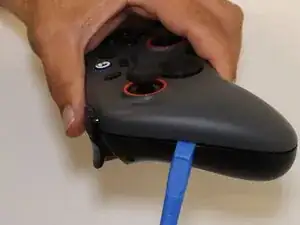
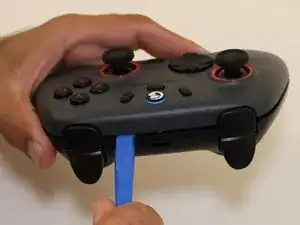
Insert an opening tool between the two halves to open the controller's casing.
-
Disconnect them by sliding the opening tool along the seam in the casing, applying continuous pressure.
-
Once you find a connector, apply increased pressure until you hear a snapping sound.
-
Repeat this process until all of the connectors are disconnected.
-
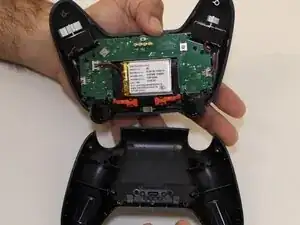
Separate the top and bottom of the controller case.
-
-
-
Set aside the bottom half of the shell.
-
Position the controller so that the motherboard is visible.
-
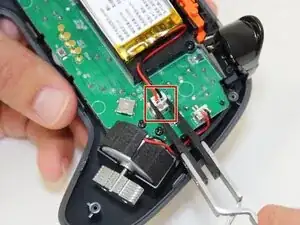
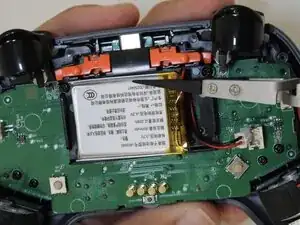
Use the point of a spudger to push on alternating sides of the battery connector to "walk" it out of its socket.
-
-
-
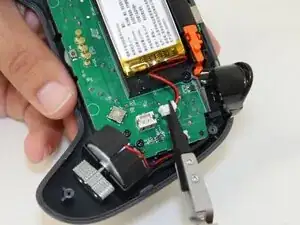
Use a spudger to loosen the tape securing the battery.
-
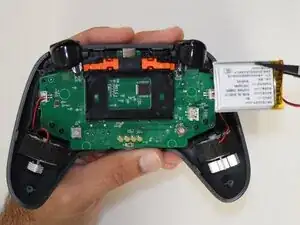
Remove the battery from the controller.
-
To reassemble your device, follow these instructions in reverse order. Take your e-waste to an R2 or e-Stewards certified recycler.