Introdução

How to remove the back panel from a Game Boy Advance.

  1. W5xHDkFFxsZPAfqJ
    W5xHDkFFxsZPAfqJ
    YLRFrpXTUJnvKIMt
    sVYy54cZhr1yVDYY
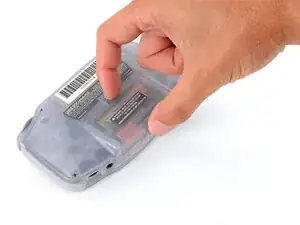
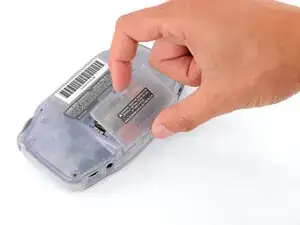
    • Release the battery cover tab with your finger and swing the cover away from your Game Boy to remove it.

    • During reassembly, insert the tabs on the bottom edge of the cover into their cutouts and press the cover into place.

  2. maxmprfVqllPKMpO
    maxmprfVqllPKMpO
    IWHASUO3UyEVPZNr
    lLsZLi2bYgQJgD5N
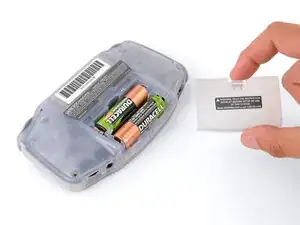
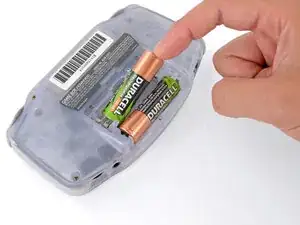
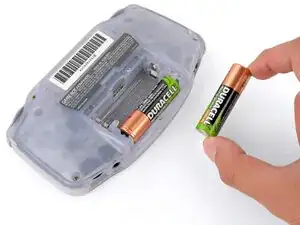
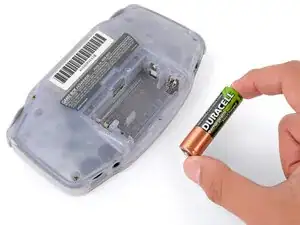
    • Remove the two AA batteries.

    • If the metal terminals are corroded, follow this guide to clean them.

    • When installing batteries, use the diagram in the battery well to properly orient them.

  3. EdmFB3lCk51Otdqm
    EdmFB3lCk51Otdqm
    HlN6WaAqxPChbau3
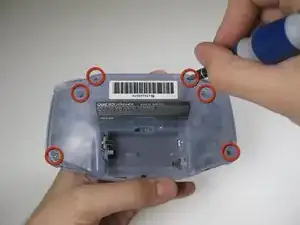
    • Remove the six back panel screws using a Tri-wing Screwdriver.

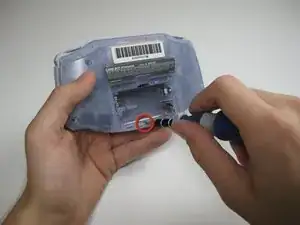
    • Remove bottom back panel screw with a Phillips #1 screw driver. (Image #2)

  4. sSNaRIcxSqRTPVfl
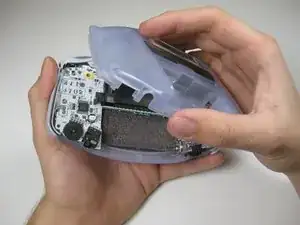
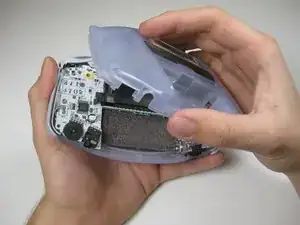
    • Remove the back panel by pulling away with one hand and the front secured in the other hand.

    • Removal of the back panel may cause shoulder buttons and side panels to come loose and fall off.

Conclusão

To reassemble your device, follow these instructions in reverse order.

Aldo Corona

Membro desde: 26/01/10

886 Reputação

0 comentários