Introdução

  1. PbfUTyYSpLZb3Buu
    PbfUTyYSpLZb3Buu
    OQbOnHOL4QJoHNbv
    gs2xPVUKHRSvKPhW
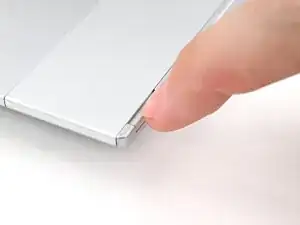
    • Flip your laptop over and open it.

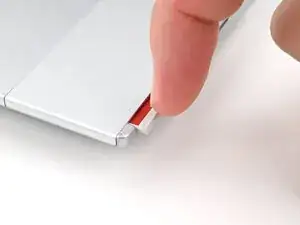
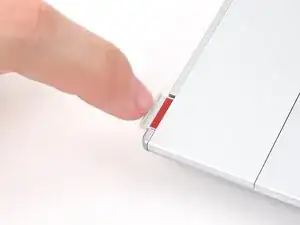
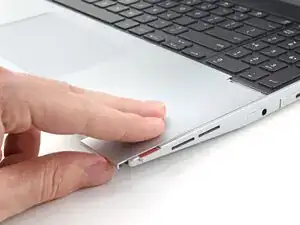
    • Use your fingernail to pull out the two Input Module latches and unlock them.

    • The latch will show red if it's unlocked.

  2. bpMHQhFddpbbE5c4
    bpMHQhFddpbbE5c4
    G1ZKNGUFENLOYu3K
    mOP6TMapXCANPZFK
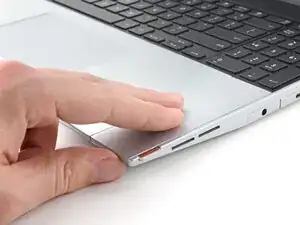
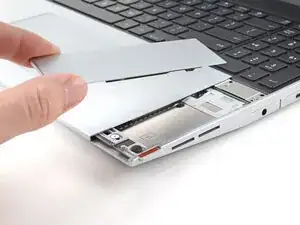
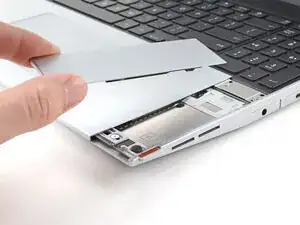
    • Use your fingers to slide the Touchpad Spacer toward the bottom edge of the laptop and unclip it.

    • If you're having trouble, check if the corresponding Input Module latch is properly unlocked.

    • Lift the Touchpad Spacer off the laptop and remove it.

  3. oEqip25KTEF2gXZt
    oEqip25KTEF2gXZt
    teuRGEDSLRjVVpId
    mbydNVpAcqSPltCM
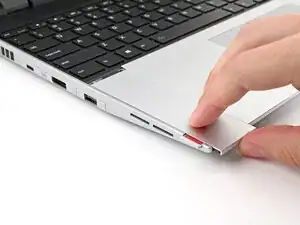
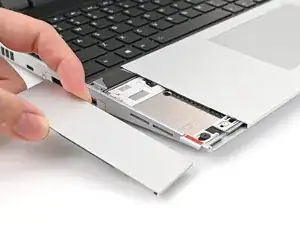
    • Repeat the same procedure for the other touchpad spacer.

Conclusão

To reassemble your device, follow these instructions in reverse order.

Repair didn’t go as planned? Try some basic troubleshooting, or ask our Answers Community for help.

Alex Diaz-Kokaisl

Membro desde: 16/01/22

227430 Reputação

0 comentários