Introdução

  1. ZraR5hRvK1scuQ4B
    ZraR5hRvK1scuQ4B
    dpaOY2OTDQYHKn1t
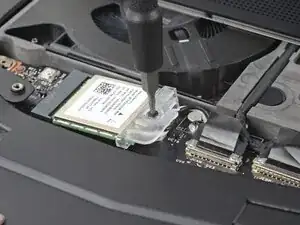
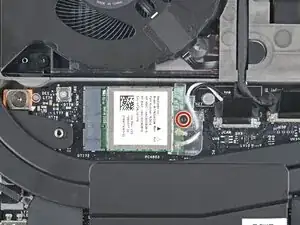
    • Use your Framework Screwdriver to loosen the captive T5 Torx screw securing Wi-Fi module.

    • The module might pop up at a shallow angle when you loosen the screw.

  2. kxIs2q2AfRQJYZ3I
    kxIs2q2AfRQJYZ3I
    5fwEQhuQLLkCoV41
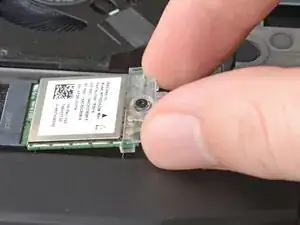
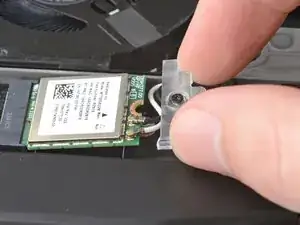
    • Slide the clear plastic cover straight off the module and remove it.

  3. diSvMbLLmRckW4OX
    diSvMbLLmRckW4OX
    jmfJKrH1QpdZqbAo
    K1bfeUb4AS1uM5WM
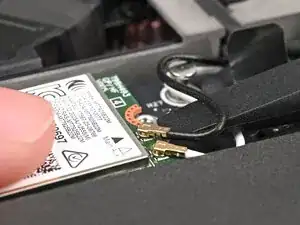
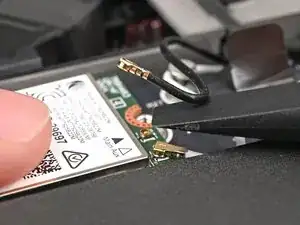
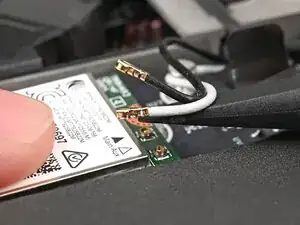
    • While holding the Wi-Fi module down, insert the flat end of your Framework Screwdriver one of the coaxial connectors, where the cable meets the metal head.

    • Lift the screwdriver straight up to disconnect the coaxial cable.

    • Repeat for the other coaxial cable.

Conclusão

To reassemble your device, follow these instructions in reverse order.

Alex Diaz-Kokaisl

Membro desde: 16/01/22

227430 Reputação

0 comentários