Introdução

  1. ndJKADTy132wVETX
    ndJKADTy132wVETX
    eBnyCBSQXOUZUKvF
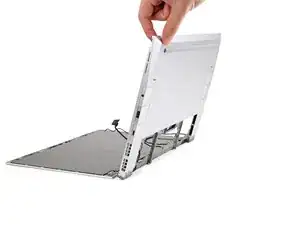
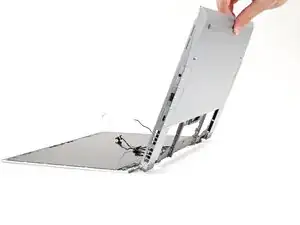
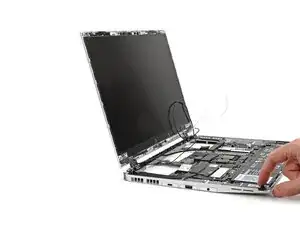
    • Tilt the laptop backwards and let it rest on its Top Cover.

  2. lGGiNIPhyfqW2EXH
    lGGiNIPhyfqW2EXH
    sAPRqAGQp1dTVPxN
    jeoN1ORBOiQuMWgi
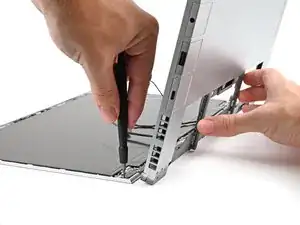
    • While supporting the Bottom Cover with one hand, use your Framework Screwdriver to remove the five 2.4 mm‑long screws on each hinge connected to the Top Cover (10 total).

  3. ctfXkrULfOmHDSOv
    ctfXkrULfOmHDSOv
    QyxJ62GOZBCMMaxr
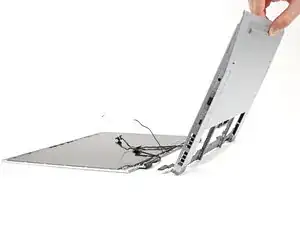
    • Lift the Bottom Cover from the Top Cover and remove it.

  4. ravSZqXutWsbVPLR
    ravSZqXutWsbVPLR
    upwmgTPDp2MshVQF
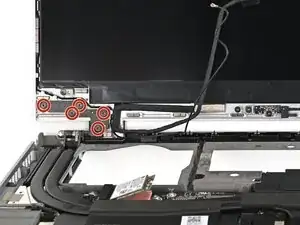
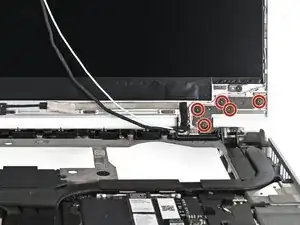
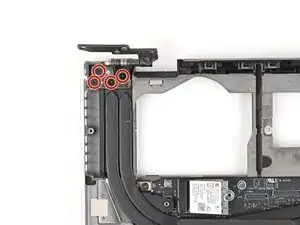
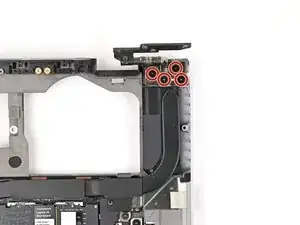
    • Use your Framework Screwdriver to remove the four 3.9 mm‑long screws on each hinge connected to the Top Cover (8 total).

  5. lMuJiJkquSamqJyp
    lMuJiJkquSamqJyp
    BIERXggiMMqLIwTZ
    tkmRFVyDUvOTJTU5
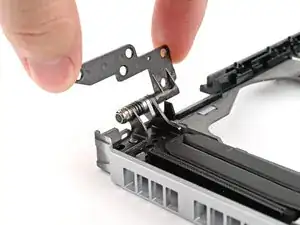
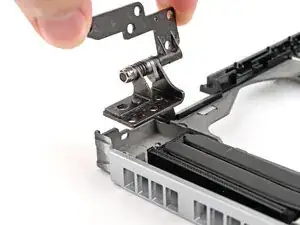
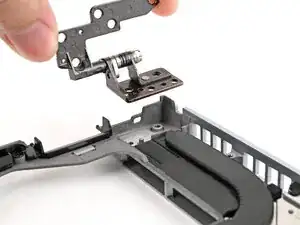
    • Lift the hinges out of their slots in the Bottom Cover and remove them.

Conclusão

To reassemble your device, follow these instructions in reverse order.

Alex Diaz-Kokaisl

Membro desde: 16/01/22

227430 Reputação

0 comentários