Introdução

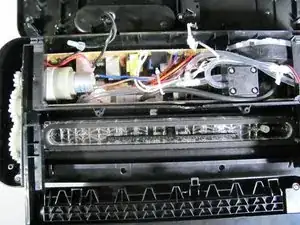
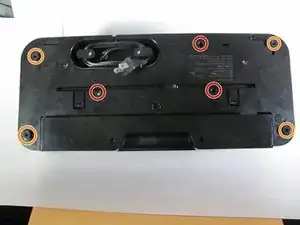
The most difficult part of this operation is finding the necessary screws that will have to be removed using a PH2 Phillips Head screw driver and spudger. In order to view the vacuum pump and/or inspect the inner workings of you appliance this bottom panel must be removed first.

  1. CqJnt5261ooeLOdH
    CqJnt5261ooeLOdH
    uwEUnX5wefj5IVVb
    • Use the PH2 screwdriver to remove the three 14mm Phillips Head screws.

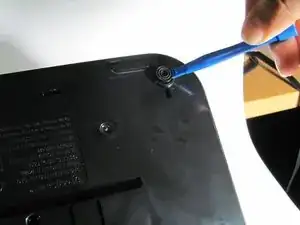
    • Use a plastic opening tool to remove the rubber toppers, covering four more 14mm Phillips Head screws, and remove those screws with the same screwdriver.

  2. TkcRJQCq41vfwqhi
    • You may now carefully unhinge the bottom panel.

    • The bottom panel does not completely come off. There are many wires connecting the panel to the body of the machine, so be careful not to remove any of them on accident.

    My unit wasn't vacuuming the bags properly. I followed your instructions and found a vacuum line pinched closed. I repositioned it and the unit works great. Thanks for posting this. It saved me from having to buy a new unit.

    matt.doran228 -

    I carefully unfolded the bottom tray. I used q-tips and a toothbrush to clean the flippers and surrounding clear plastic area, rubber seals. They were really dirty. Also, I actually removed the flippers, but be very careful for the teeny tiny springs that are attached. One of them flew off and I made sure to take a picture of the other one. After a thorough cleaning I assembled everything back together and it works fine. These instructions and photos were very helpful.

    Even more helpful would be information where to acquire parts like the seals? Anyone at IFIXIT?

    Mark P. -

Conclusão

To reassemble your device, follow these instructions in reverse order.

Mackenzie Grossgold

Membro desde: 14/04/16

940 Reputação

0 comentários