Introdução
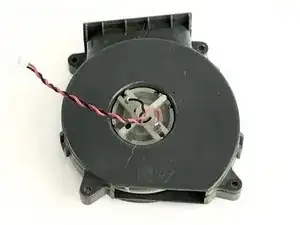
If your Ecovacs DEEBOT D35 ever begins to miss picking up pieces of rubbish that it would normally do, use this guide in order to replace the vacuum motor part inside of it.
The motor is the main component on why vacuums produce suction. A faulty vacuum will provide no suction and failure to pick up any pieces of trash.
Before using this guide, remove any dust from the dustbin and power on the vacuum to ensure that the issue wasn’t that the vacuum was already filled.
Ferramentas


-
-
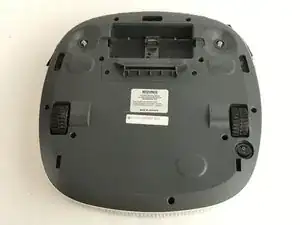
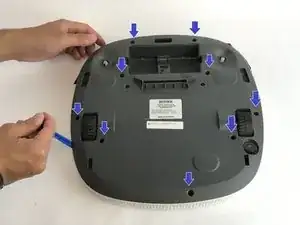
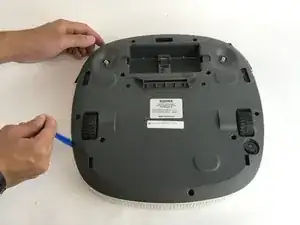
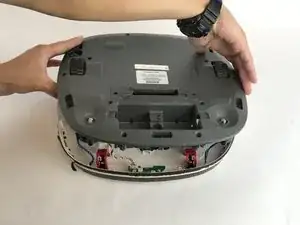
Locate the 9 screws that secure the back cover. Remove with a PH2 Phillips Head Screwdriver. The screws are:
-
7 x 14mm screws
-
2 x 10mm screws
-
-
-
Carefully lift the back cover from the body of the Deebot to expose the internal wiring harnesses.
-
-
-
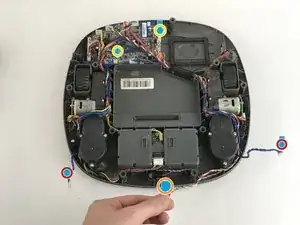
There are 5 wiring harnesses that need to be disconnected before completely removing the back cover.
-
There are two blue wiring harnesses on the front left and right side (located next to the sensor). They are represented by the red circles.
-
There is a multicolor wiring harness on the front center. This is represented by the orange circle.
-
Two black and red wiring harnesses are connected to the motherboard. This is represented by the yellow circles.
-
-
-
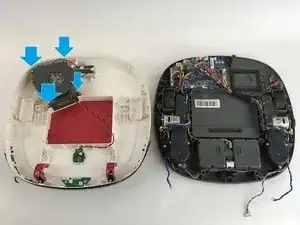
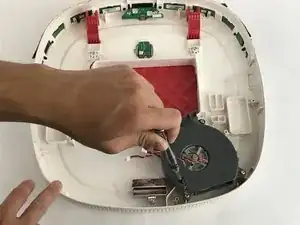
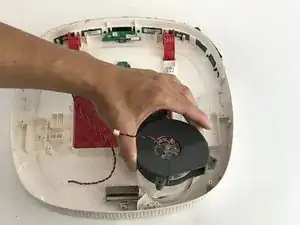
Remove the screws from the vacuum motor body with a PH2 Phillips Head Screwdriver. The screws are:
-
4 x 10mm screws
-
To reassemble your device, follow these instructions in reverse order.

Um comentário
thanks a lots for the valuable info
sk law -