Introdução

If your Dell XPS 15 9560 fails to charge, the battery dies unusually quick, or the laptop cannot power on without being connected to the charger, the battery may be faulty and in need of a replacement.

A battery is responsible for providing power to the device. Overcharging the laptop by leaving it on the charger after it has reached its maximum charge or exceeding the number of charging cycles the battery can withstand will deteriorate the functionality of the battery.

When examining the your laptop or battery, take care to see if it is swollen. A swollen battery, when punctured, can cause a fire or an explosion. Follow this informative guide on possible signs, causes, and removal.

Ensure that the laptop is turned off and unplugged before beginning.

  1. ewqdxmkHpNACxVa4
    • Before beginning, unplug the charger and any peripheries. If possible, discharge your battery below 25%.

    • Shut the laptop down.

  2. jUKaXAtFqXsZ1xJL
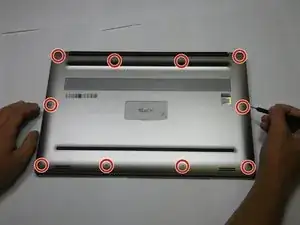
    • Remove the ten 4.0 mm screws from the back panel of the laptop using a T5 Torx screwdriver.

  3. OWsK3uFQ2DGW6vdZ
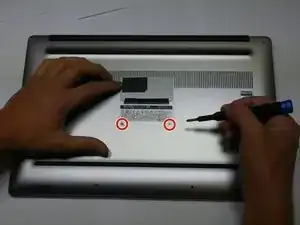
    • Remove the two 5 mm screws underneath the XPS badge door using a Phillips screwdriver

    I used PH0 screwdriver

    Gerald Dennett -

  4. Kt2Tg1sk3VDMyqZS
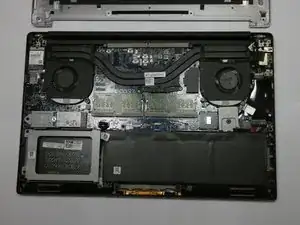
    • Use a scribe to remove the bottom base cover from the backplate.

  5. BMDNuJGST1pYSydH
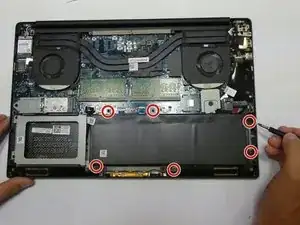
    • Using a T5 Torx screwdriver, remove the six 4.0 mm screws.

    On the Dell XPS 15 9560 that I just did a battery replacement on the battery was not held in by torx screws. It was the larger 97wh battery and was held in by 6 phillips head screws. I was able to get them out with a PH1 bit.

    Nick Hamblen -

    Seconded. In the photo the author isn't even holding a torx driver.

    Gregory Robben -

    Same, by me it was held by 8 philips screws labeled M2X4.

    Sven Oelker -

    Mine is the smaller battery, held in by four PH0 screws. The two towards the middle of the computer in the photo above are not present.

    Gerald Dennett -

  6. EIPhbwKanoubPUAV
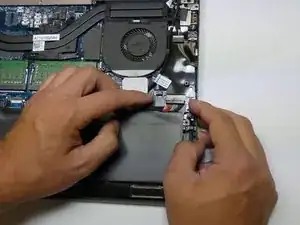
    • Use your fingernails to gently "walk" the battery connector directly out of its socket.

    How is it unplugged?

    Julie Treuner -

  7. 42vITSAgbhUs33vj
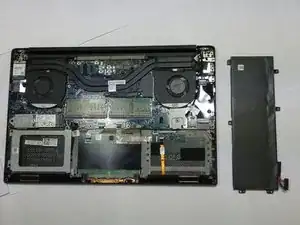
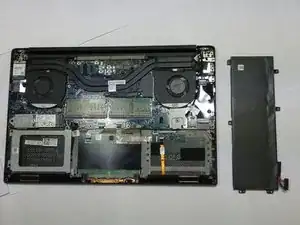
    • Remove the battery.

Conclusão

To reassemble your device, follow these instructions in reverse order.

For optimal performance, after completing this guide, calibrate your newly installed battery.

Take your e-waste to an R2 or e-Stewards certified recycler.

Jada Houser

Membro desde: 28/09/21

875 Reputação

Um comentário

If you have an additional HDD you need to use the type H5H20 instead of the 6GPTY. The configuration as shown in picture 6 isn't possible with the 6GPTY unless you're willing to remove the HDD.

Tim -