Introdução
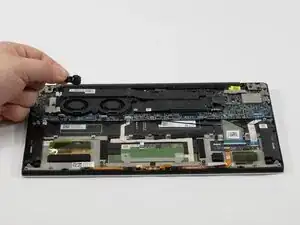
If your Dell XPS 13 7390 keeps losing the date and time or shows BIOS errors when starting up, the CMOS battery might be going bad.
These small batteries wear out over time, and when they do, your laptop can have trouble saving basic system settings. If you notice these issues, replacing the CMOS battery is a good first step.
Before starting this repair, make sure the laptop is completely powered off and unplugged from any devices.


-
-
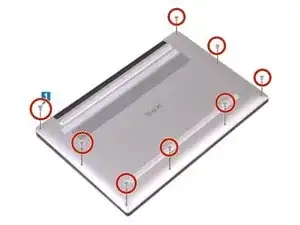
Remove the eight 3 mm screws that secure the base cover to the palm-rest assembly using a T5 Torx screwdriver.
-
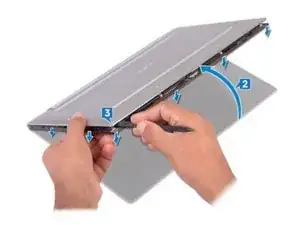
With the computer face-down, open it at an angle.
-
Using a spudger, pry the base cover from the palm-rest assembly, starting at the front left and right corners.
-
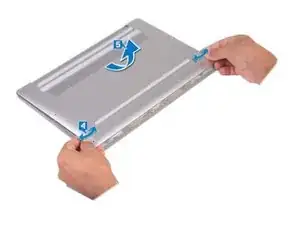
Moving the base cover from left to right, release the clips securing the base cover to the palm-rest assembly.
-
Lift the base cover from the palm-rest assembly.
-
-
-
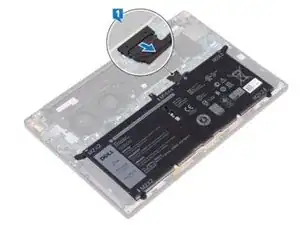
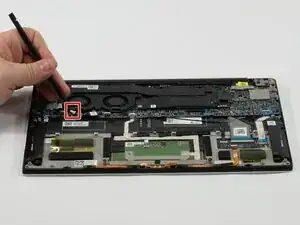
Disconnect the battery from the system board.
-
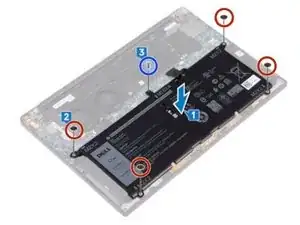
Remove the four screws (M2x2) that secure the battery to the palm-rest assembly.
-
Remove the screw (M1.6x4) that secures the battery to the palm-rest assembly.
-
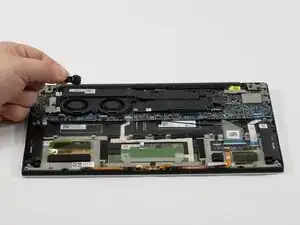
Lift the battery off the palm-rest assembly.
-
Turn the computer over, open the display, and press the power button for about 5 seconds to ground the computer.
-
To reassemble your device, follow these instructions in reverse order.