Introdução
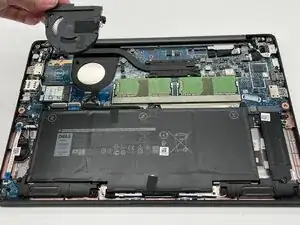
In this guide, you will be learning how to replace the cooling fan in a Dell Latitude 7400. The fan is used to keep the contents inside the laptop from overheating. This helps your laptop to run smoothly and prevents damage. If your laptop has been running hot, shutting off randomly, or making funny fan noises, a faulty fan may be the case. This guide will step by step walk you through how to effectively replace that battery.
Ferramentas

-
-
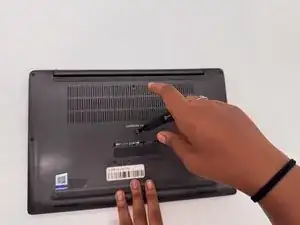
Lay the laptop on a flat hard surface facing downward.
-
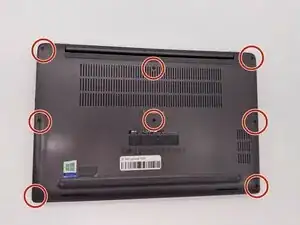
Use a Phillips #0 screwdriver to remove the eight 3 mm screws that secure the lower case.
-
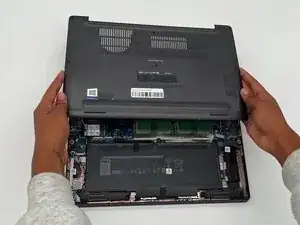
Lift the lower case off and set that aside.
-
-
-
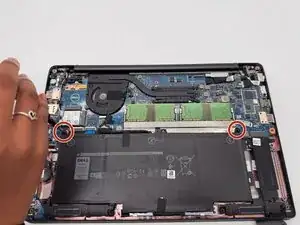
Use a Phillips #0 screwdriver to loosen the two 3 mm captive screws that secure the battery.
-
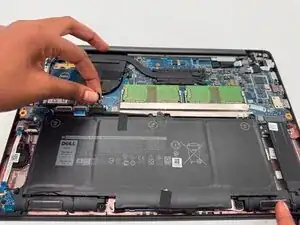
Gently grip the battery connector loop and lift it to disconnect the battery connector.
-
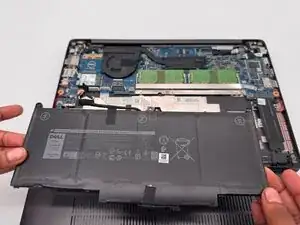
Lift the battery up and out.
-
-
-
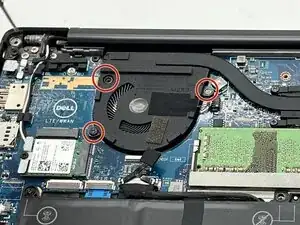
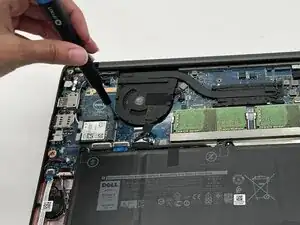
Remove the three 2 mm Phillips screws that secure the fan.
-
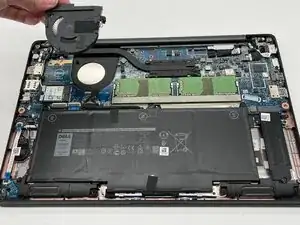
Lift the fan up and out of the laptop.
-
To reassemble your device, follow the above steps in reverse order.
Take your e-waste to an R2 or e-Stewards certified recycler.
Repair didn’t go as planned? Try some basic troubleshooting or ask our Answers community for help.