Introdução
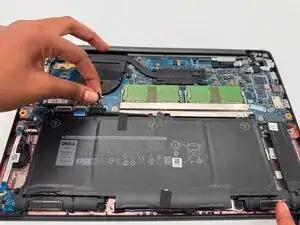
In this guide, you will learn the steps on how to replace the battery on a Dell Latitude 7400. Over time, batteries lose their charge causing it to have a shorter battery life or worse, shutdown. Replacing this battery can restore the performance of your computer and provide a longer battery life. Before beginning, be sure to power off your device and disconnect from any external power source.
Ferramentas


-
-
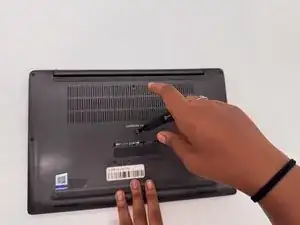
Lay the laptop on a flat hard surface facing downward.
-
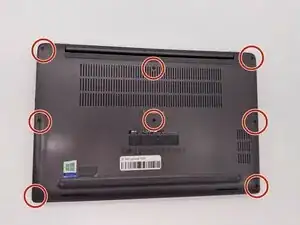
Use a Phillips #0 screwdriver to remove the eight 3 mm screws that secure the lower case.
-
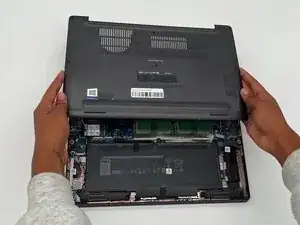
Lift the lower case off and set that aside.
-
-
-
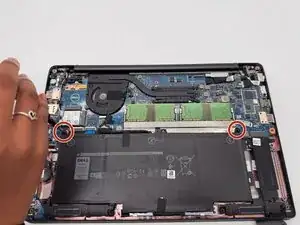
Use a Phillips #0 screwdriver to loosen the two 3 mm captive screws that secure the battery.
-
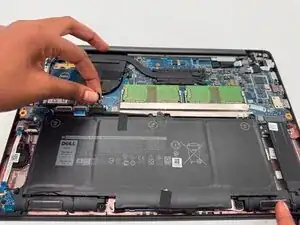
Gently grip the battery connector loop and lift it to disconnect the battery connector.
-
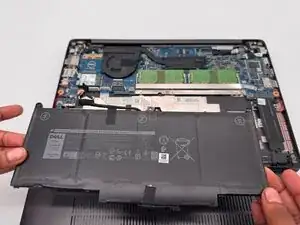
Lift the battery up and out.
-
To reassemble your device, follow the above steps in reverse order.
For optimal performance, after completing this guide, calibrate your newly installed battery.
Take your e-waste to an R2 or e-Stewards certified recycler.
Repair didn’t go as planned? Try some basic troubleshooting or ask our Answers community for help.