Introdução

  1. MAflpuSYWmBEsFWK
    MAflpuSYWmBEsFWK
    pC2UcUl4lRF2Bt4N
    XWHFxbjjhihwDDCk
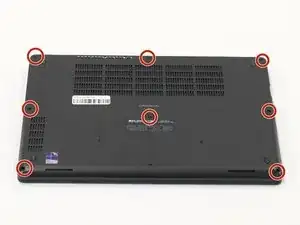
    • Orient your laptop so that you have access to the lower case, with the vents facing upwards.

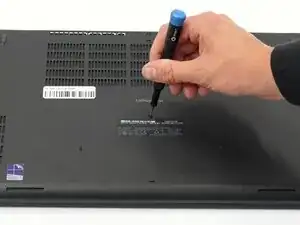
    • Use a Phillips screwdriver to loosen the eight screws securing the bottom cover.

    • They are captive screws and do not fully come out of the holes. Don't force them or you may damage the screws or holes on the bottom case.

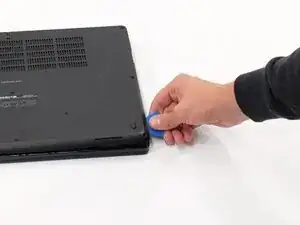
    • Insert the end of an iFixit opening tool or an opening pick into the seam between the bottom and top case to release the clips holding them together.

    • Slide the opening tool or pick around the edge of the laptop until the case is fully released.

    • Remove the lower case.

  2. WTAbUVjKAeCHrQWq
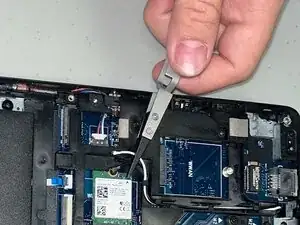
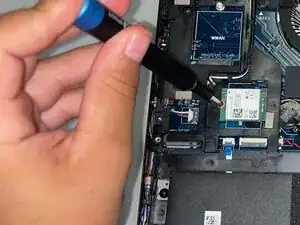
    • Use tweezers to pry up and disconnect the Wi-Fi card coaxial connectors.

  3. peeWnNuMwTBD3qDG
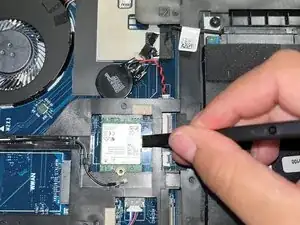
    • Remove the single Phillips #1 3.5 mm-long screw securing the Wi-Fi card.

  4. IhSnsewIQ6PLTunS
    IhSnsewIQ6PLTunS
    ltpctNJyvDRESluO
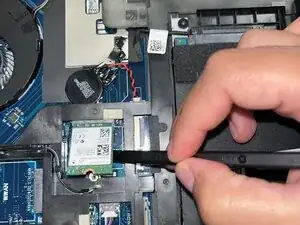
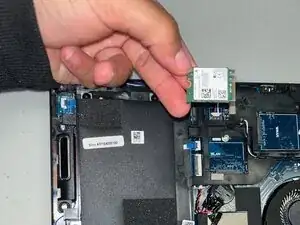
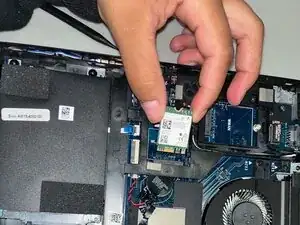
    • Use a spudger or your finger to gently lift the Wi-Fi card.

  5. 4lkO3LGnlkXPoO6R
    4lkO3LGnlkXPoO6R
    aIMcPKCgbMyREKdY
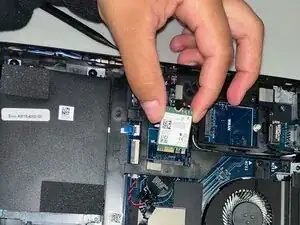
    • Remove the Wi-Fi card.

Conclusão

To reassemble your device, follow the above steps in reverse order.
Take your e-waste to an R2 or e-Stewards certified recycler.
Repair didn’t go as planned? Try some basic troubleshooting or ask our Answers community for help.

Faith Byrd

Membro desde: 08/09/25

109 Reputação

0 comentários