Introdução
This guide will teach you how to remove and replace your Dell Latitude 5400's heatsink. The heatsink allows for your laptop to run properly without overheating. If your heatsink is faulty and is causing your laptop to overheat it can lead to issues such as the screen freezing up, your laptop shutting off on its own, the risk of ruining other parts inside the machine, and a really hot laptop case which can burn your hands and risk the burning of certain materials. If you are experiencing any of the above symptoms, please refer to any overheating troubleshooting resources you have at your disposal as overheating is not solely caused by the device's heatsink.
Before you start following this guide, please ensure that your Dell Latitude 5400 is completely powered off and you have the charging cable removed. Once you have made sure the device is completely powered off and has had its charging cable removed, please wait 10 - 15 minutes before starting the repair to allow any hot components the time needed to cool.
Ferramentas


-
-
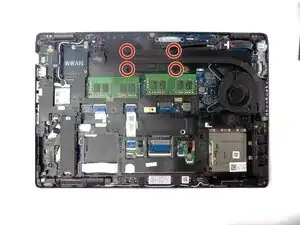
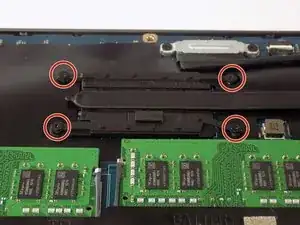
Remove the four 3 mm Phillips screws found at the corners of the heatsink.
-
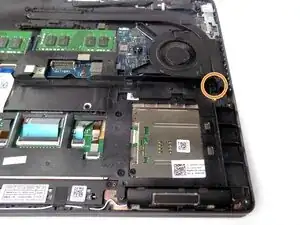
Remove the one 5 mm Phillips screw found at the end of the heatsink just below the fan unit.
-
-
-
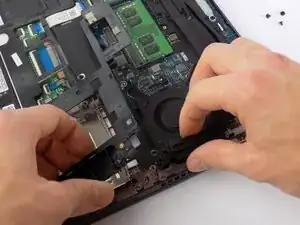
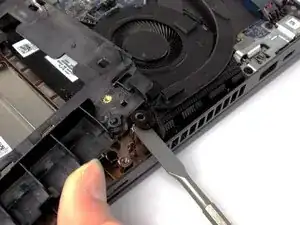
Lift the plastic housing below the fan with your free hand and lift the heat sink out from below the plastic housing with a spudger.
-
-
-
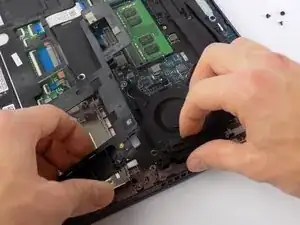
With your hand still raising the plastic housing, lift and remove the heat sink from your device.
-
To reassemble your device, follow these instructions in reverse order.