Introdução
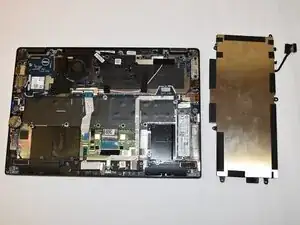
If the battery in your Dell Latitude 5289 2-in-1 is no longer functioning properly, this guide will show you how to replace it.
Before starting the repair, power off the laptop, undock it if it's connected to a docking station, and unplug all cables. Open the display and press and hold the power button for a few seconds to discharge residual power from the system board. Remove any installed ExpressCards or Smart Cards, and remove the MicroSD card from the laptop.
Ferramentas

-
-
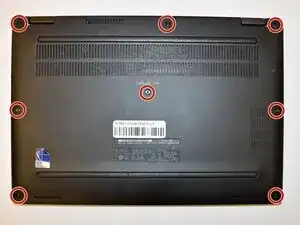
Loosen the eight 5 mm captive screws in the base cover using a Phillips #00 screwdriver.
-
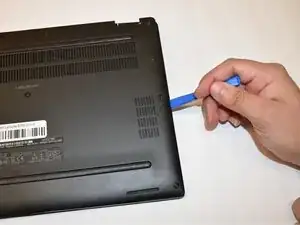
Gently pry the base cover with an opening tool starting from the hinges at the top edge.
-
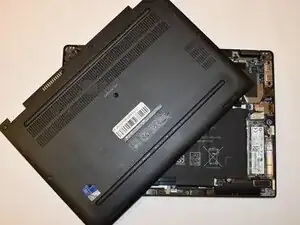
Lift the cover off of the laptop.
-
-
-
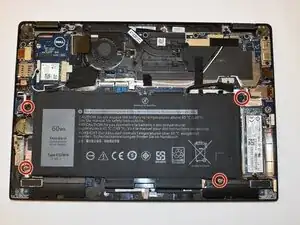
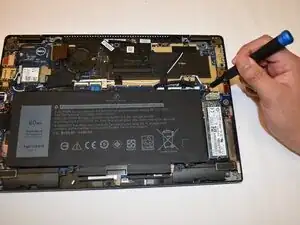
Remove the four 4 mm screws that hold the battery in place using a Phillips #00 screwdriver.
-
-
-
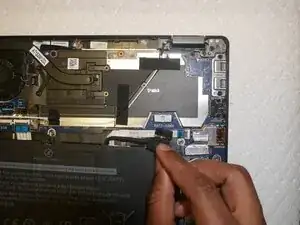
Lift the ribbon and disconnect the battery cable from the connector on the system board.
-
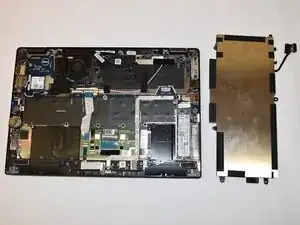
Lift the battery away from the computer.
-
To reassemble your device, follow these instructions in reverse order.
