Introdução
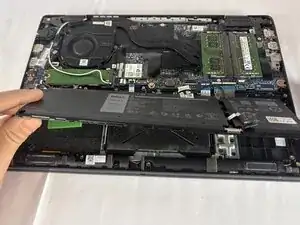
If your Dell Latitude 3420 is experiencing battery problems such as rapid draining, failure to hold a charge, overheating, or the laptop shutting off unexpectedly use this guide to replace the internal battery.
The battery supplies power to the laptop when it's not connected to the charger. A worn out or failing battery can lead to poor performance, short runtimes, or a laptop that only works while plugged in. Before using this guide, check your laptop’s battery status in Windows and confirm the issue is related to the battery itself. Also inspect the charging port and power adapter to rule out connection problems.
This repair requires removing the bottom cover and disconnecting the internal battery from the motherboard. The battery in the Latitude 3420 is secured with screws and a cable connector. Once the old battery is removed, install the new battery, reconnect it, and reassemble the laptop. Before beginning, completely shut down your laptop, disconnect the charger, and unplug any accessories. If your battery is swollen, take appropriate precautions.
Ferramentas


-
-
Close the laptop lid and set the laptop down with the lower case facing you.
-
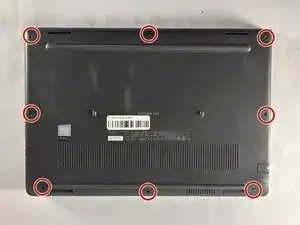
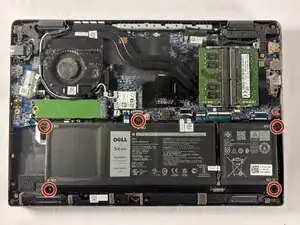
Use a Phillips #00 screwdriver to remove the seven 7 mm-long screws securing the lower case.
-
-
-
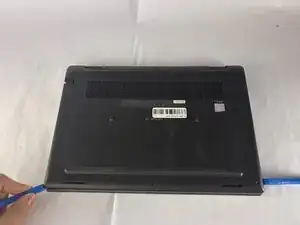
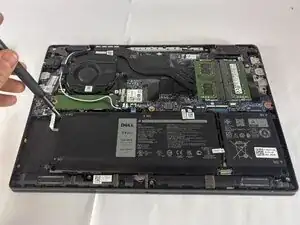
Insert an opening tool into the seam between the lower case and chassis.
-
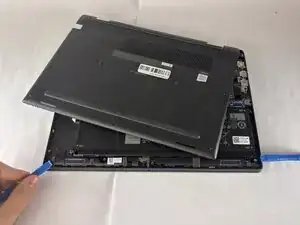
Pry around the entire perimeter until the lower case fully releases.
-
Remove the lower case.
-
-
-
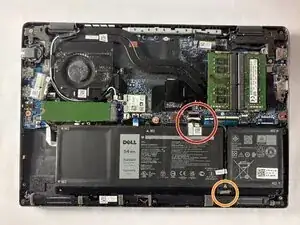
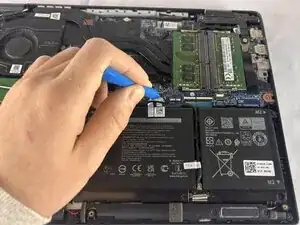
Use an opening tool to gently push the battery connector directly out of its motherboard socket.
-
Disconnect the second cable by pushing the connector toward the battery as well.
-
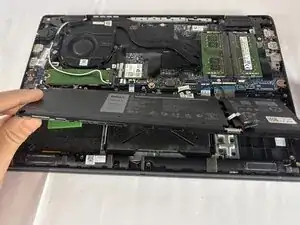
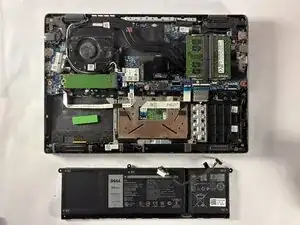
To reassemble your device, follow the above steps in reverse order.
For optimal performance, after completing this guide, calibrate your newly installed battery.
Take your e-waste to an R2 or e-Stewards certified recycler.
Repair didn’t go as planned? Try some basic troubleshooting or ask our Answers community for help.
