Introdução
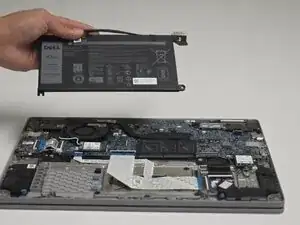
If your laptop is not turning on or holding a charge, then you need to get your battery replaced. In order to remove the battery of a Dell Latitude 3310 for any reason, you can use this guide to walk you through the process of removing the bottom part of the laptop and safely disconnecting the old battery without damaging or interfering with other important components.
There are no hard steps; just be careful when the cover is off and avoid flipping the laptop, as that could cause other components to come loose. For this replacement, you will only need to work with the laptop facing down.
Ferramentas


-
-
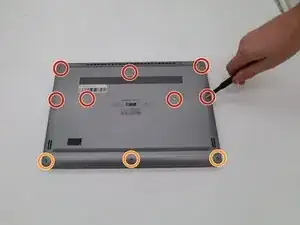
Remove seven 8.0 mm screws using a Phillips #1 screwdriver.
-
Remove three 5.0 mm screws using a Phillips #1 screwdriver.
-
-
-
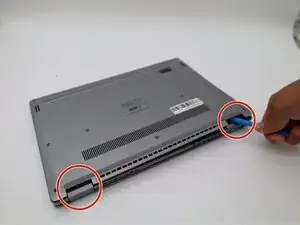
Using the iFixit opening tool, gently pry between the body of the laptop and the bottom cover. Make your way around the laptop carefully releasing all plastic clips.
-
The screen hinges are an ideal spot to begin prying.
-
-
-
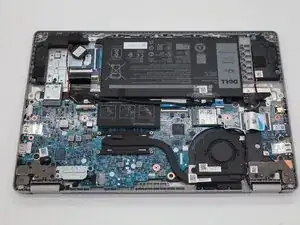
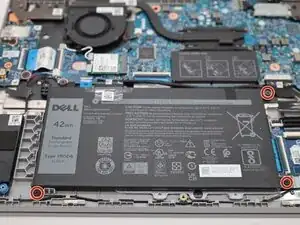
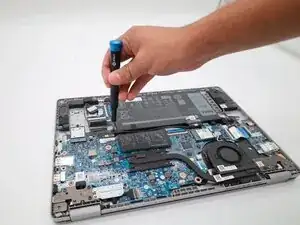
Remove the three 3 mm screws that hold the battery in place using a Phillips #1 screwdriver.
-
-
-
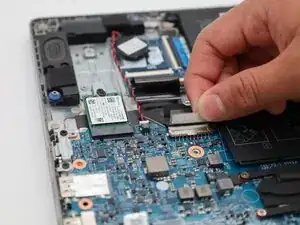
Gently lift the adhesive securing the battery cable.
-
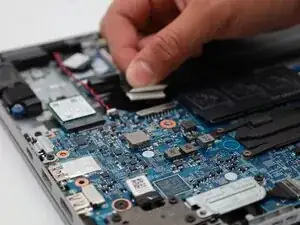
Carefully pull out the cable to disconnect the battery.
-
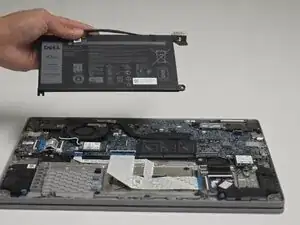
Once the cable is disconnected, lift the battery out.
-
To reassemble your device, follow these instructions in reverse order.