Introdução

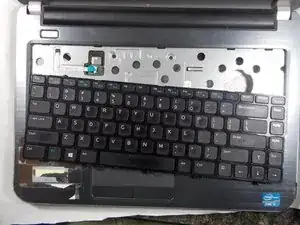
This guide will show you how to remove the keyboard on a Dell Inspiron 14R-5421 laptop. Following these steps in reverse order can also be used put the keyboard on to a Dell Inspiron 14R-5421. It's important to follow these steps closely to guarantee a successful removal or addition of the keyboard.

  1. wVs1AWDy2NXWUesI
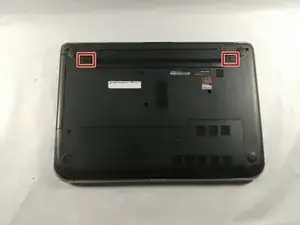
    • Push the two sliders away from the battery towards the outer edges.

  2. PY4eJMrVXdYwbjHn
    PY4eJMrVXdYwbjHn
    IEbilHBB1xCGr5LX
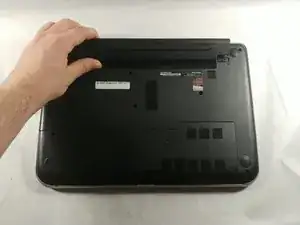
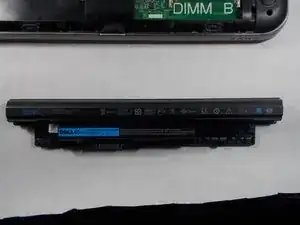
    • Remove the battery when it pops up.

  3. TnZwBIGPPJKRfMjW
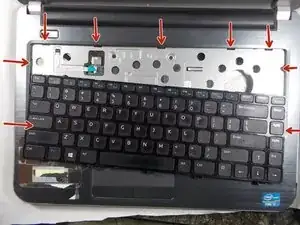
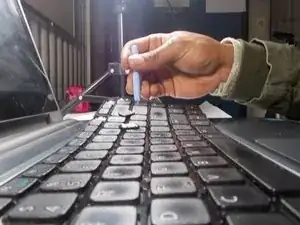
    • Insert a plastic opening tool into the top edge of the keyboard. Push the tool inward to release each of the keyboard’s clips.

    • Work from left to right until all the clips are free.

  4. CxidvNsckQKqg4Em
    • Using a pry tool, detach the 9 clips from the keyboard by prying at a 90 degree angle.

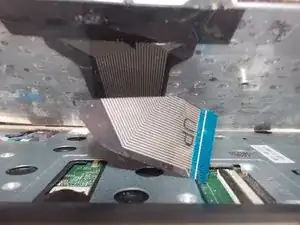
    • Be careful while detaching and do not lift the keyboard too high or be too rough. The keys can break easily and there is a fragile ribbon cable beneath the keyboard.

  5. 2BwC3NMVsjlfL3us
    • Carefully disconnect the ribbon cable from the socket and pull apart.

    • The cable could be connected to other components of the laptop.

Conclusão

To reassemble your device, follow these instructions in reverse order.

Jared paiva

Membro desde: 27/03/18

504 Reputação

0 comentários