Introdução
Disassemble the back cover of the Canon PowerShot SX120 IS in order to open the camera and access the inside components.
Ferramentas


-
-
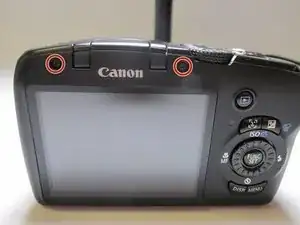
Turning the camera so the screen is facing you.
-
Remove the two black 3.4 mm screws with a Phillips #00 screwdriver.
-
-
-
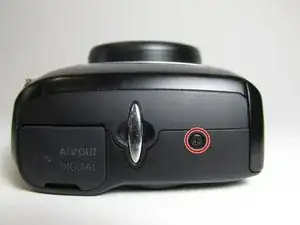
Put the camera with the lens facing up and turn it to the side so the DC IN A/V OUT DIGITAL is facing you.
-
Remove the single black 3.4 mm screw with a Phillips #00 screwdriver.
-
-
-
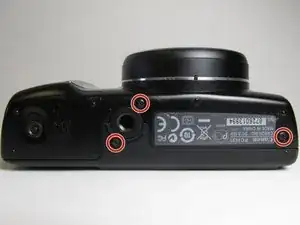
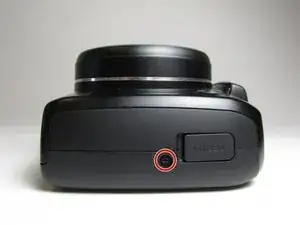
Put the camera with the lens facing up, and turn it to the side where the battery cover is located.
-
Remove the three black 3.4 mm screws with a Phillips #00 screwdriver.
-
-
-
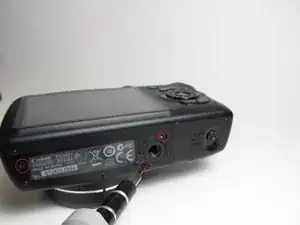
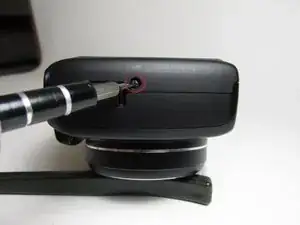
Put the camera with the lens facing up, turn it to the side where the compartment of the battery (CR1220) for time/date is located.
-
Remove the single black 3.4 mm screw with a Phillips #00 screwdriver.
-
-
-
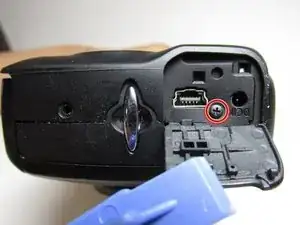
Put the camera with the lens facing down, and turn it to the side where the DC IN A/V OUT DIGITAL cover and the silver lanyard attachment are located.
-
Open the DC IN A/V OUT DIGITAL cover.
-
Remove the single black 3.4 mm screw with a Phillips #00 screwdriver.
-
-
-
Turn the camera with the lens facing down.
-
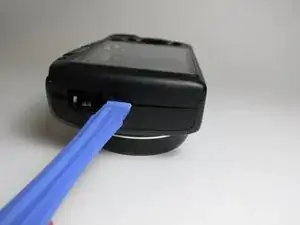
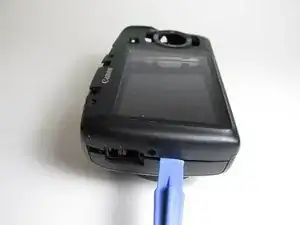
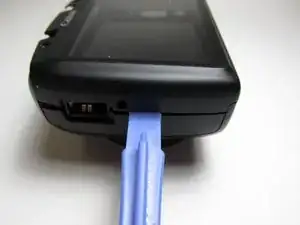
Use the iFixit opening tool to make leverage. Insert the opening tool in the seam where the front case and the back case assemble.
-
Carefully put pressure on the opening tool so the cover can gradually open.
-
Slowly slide the opening tool along the gap and around the edge of the camera.
-
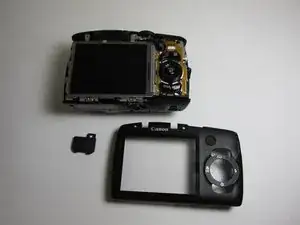
To reassemble your device, follow these instructions in reverse order.

Um comentário
It took me 2 hours to install the battery door. I dropped one screw and could not find it any more it just vanished.
I was lucky to find one just like the one I lost after a half hour search.All in all I did a pretty good good job for an
auto mechanic .Thanks very much for your help, it was very easy to follow your instructions.
Fred Czarnik