Introdução

This is a comprehensive guide to replacing the internal battery of the CAT S62 phone.

Symptoms of a malfunctioning battery are:

  • Battery is draining abnormally quickly.
  • Battery fails to hold a charge.
  • Screen turns off periodically or at random.
  1. wlFw4vCIBriXvhKI
    wlFw4vCIBriXvhKI
    IkkdSNiim4BXIVEY
    • Allow your phone's battery to drain below 25% (a charged lithium-ion battery can be a safety hazard). Turn the device off before working on it.

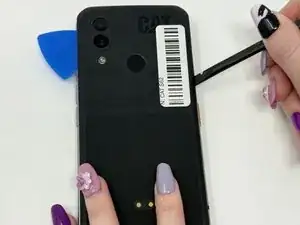
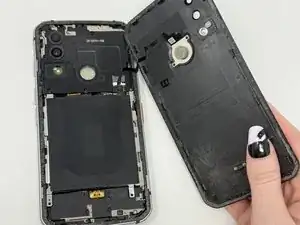
    • Use the plastic spudger to gently pry off the rubber back panel. If needed, use the plastic iFixit opening picks to help keep the plate separated. (Heating the back of the phone using a blow dryer may help loosen adhesive.)

    • Gently pull the back panel away to avoid damaging the connecting wire for the fingerprint sensor.

  2. e2fW6SCEajgLvdJR
    e2fW6SCEajgLvdJR
    3SWdNuIYVgHv5KlQ
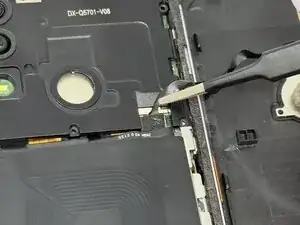
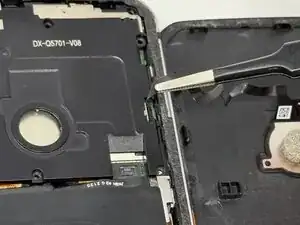
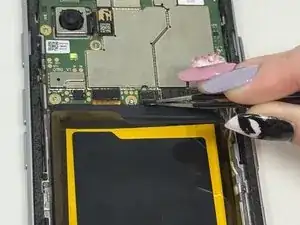
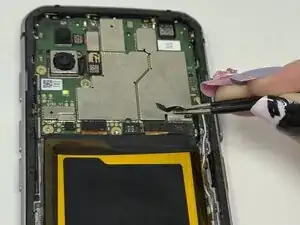
    • Gently remove the wire connecting the back cover to the rest of the phone using your fingers or tweezers.

    • Do not pull on the wire, as it may damage the cable.

  3. 1S4wDUG1kXGN2qJ5
    1S4wDUG1kXGN2qJ5
    gfK4vxAkjvlESMgl
    lAwncNMRBWTAtbqJ
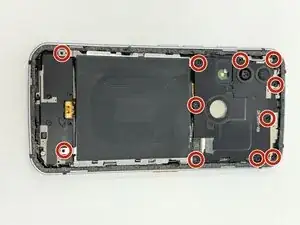
    • Remove the eleven 5mm screws with a JIS #00 screwdriver.

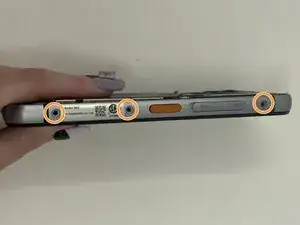
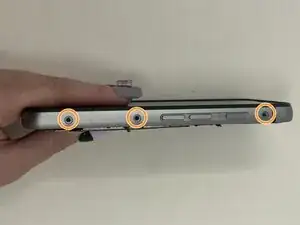
    • Remove the six 3mm screws (three screws on each side) with a Hex 1.3 mm screwdriver.

  4. 1ECQLMYSNU6PPY1O
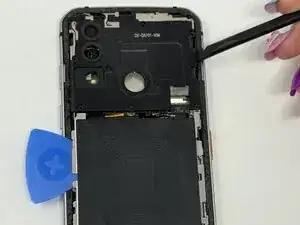
    • The battery cover is connected to the camera cover, so both covers must be removed to access the battery.

    • Pry off the camera cover using the iFixit opening picks.

    • Remove both plates.

    • The two plates are connected by a small wire. Handle with care and do not separate them from each other.

  5. JCV3Sf61Ty1KVxIq
    JCV3Sf61Ty1KVxIq
    VU66h5OYSi5KEENk
    • Disconnect the wire attached to the battery using the tweezers or your fingers.

    • Do not pull on the wire, as it may damage the cable.

  6. uVrEx1IZfRd5Jw4T
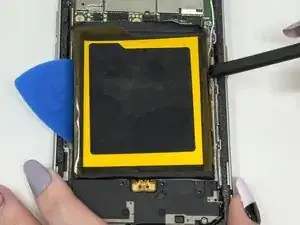
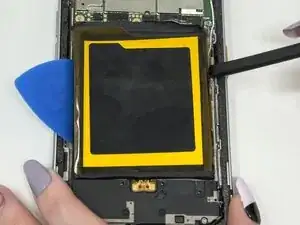
    • Use a blow dryer or other heating device for a few minutes to loosen the adhesive beneath the battery.

    • Be extremely careful handling heated metal, as it will be hot to the touch.

    • Pry the battery away using the plastic spudger and iFixit opening picks.

Conclusão

To reassemble your device, follow these instructions in reverse order.

Cassandra Schrammen

Membro desde: 09/09/25

713 Reputação

0 comentários