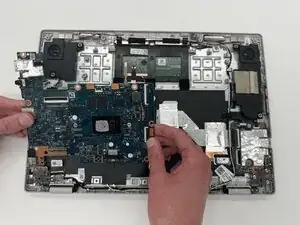
Introdução
If your laptop won't turn on, frequently crashes, receives strange error messages, or has unresponsive hardware then the motherboard might be failing. Be sure to check if your battery is working properly and is charged and once assured that the battery is not the issue move onto replacing the motherboard.
This guide will help you replace the motherboard in your ASUS Chromebook Flip CX1400FKA-AS88F and get your device running smoothly again.
Before you begin this repair, power off your Chromebook and unplug the charging adapter.


Peças
-
-
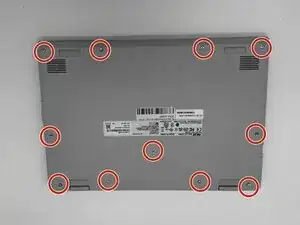
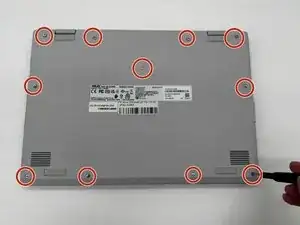
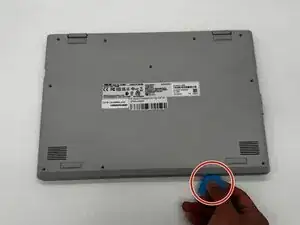
Using a Phillips #0 screwdriver, remove the eleven screws securing the bottom cover of the device.
-
-
-
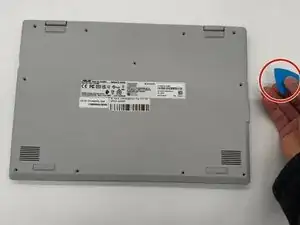
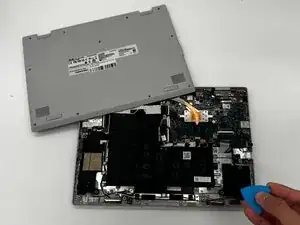
Use an iFixit opening tool or nylon spudger to gently separate the bottom cover from the Chromebook.
-
Insert the tip of the opening tool into the seam between the top and bottom covers, then slide it along the perimeter to release the internal clips securing the case.
-
-
-
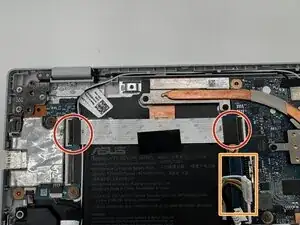
Carefully disconnect ribbon cables attached to the motherboard.
-
Also carefully disconnect the fan cables that are connected to the motherboard.
-
-
-
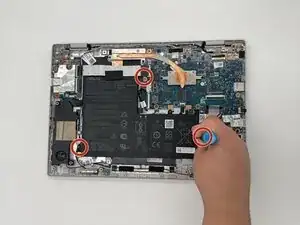
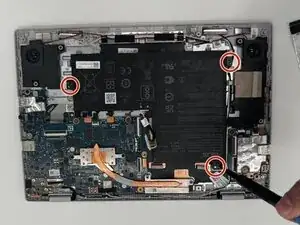
Using a Phillips #0 screwdriver, remove the three 6.4 mm screws securing the metal brackets to the motherboard assembly.
-
-
-
Disconnect the speaker wire connector from the motherboard by gently pulling it straight out of its socket using tweezers or your fingers.
-
-
-
Remove all tabs connecting the motherboard to other devices.
-
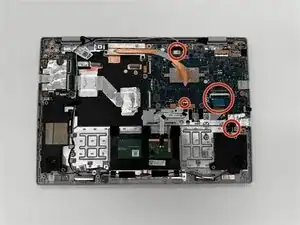
Unscrew all mounting screws securing the motherboard.
-
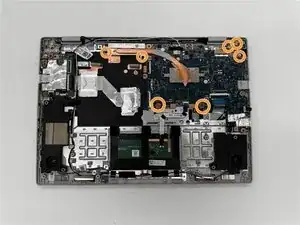
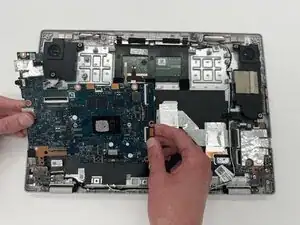
To reassemble your device, follow these instructions in reverse order. Take your e-waste to an R2 or e-Stewards certified recycler.