Introdução

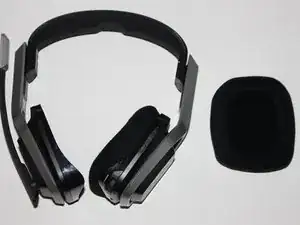
If the Astro A20 does not have any audio transmitting from the speaker then you will need to follow these steps to replace the speaker.

  1. R3DMTXYSKIihcf3l
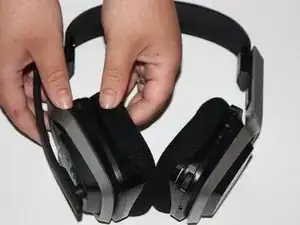
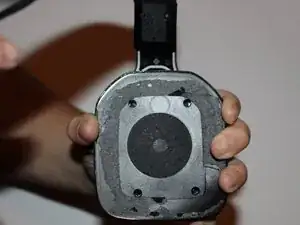
    • Place one hand on the hard side of the headset ear portion and on the cushion.

    • Lift the small portion on the edge of the cushion.

  2. f2evNQFZpJlwqNqP
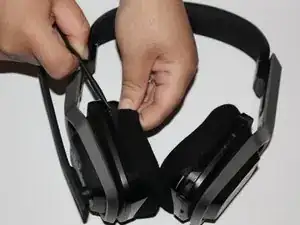
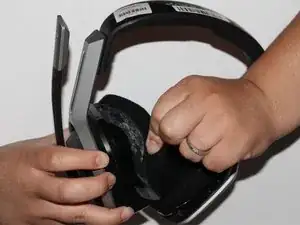
    • Slide the metal spudger underneath the lift part of the ear cushion.

    • Pull the ear cushion while wedging the spudge around the edge of the ear cushion.

    All of this is accurate, except the battery & motherboard Are on the charging port side, opposite mic side unlike picture. The right earphone is correct side.

    rebjr2880 -

    The comment above is correct: the side of battery, mother board is the opposite side of mic, this mean, the side of charger plug

    Rodolfo Borrel -

  3. PsP4oUUBERThuDMq
    PsP4oUUBERThuDMq
    ZoAGsMyWrVegrMVw
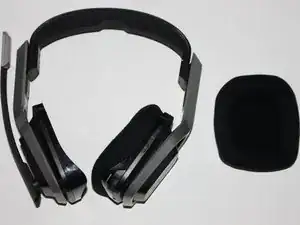
    • Remove the ear cushion from the headset.

    I prefer to use another technique: do not take off the cushion at all, and make small holes to access the screws without removing the cushion. Its perfectly possible and do not damage the cushion! Ps.: during the screw remove, the screws keeps behind the fabric.

    Rodolfo Borrel -

  4. TiBcoAAEyP3OGRmd
    • Place your hand on the opposite side of the speaker.

  5. A2mm4VEhhrJGq1ac
    A2mm4VEhhrJGq1ac
    W5i3FSTv22xDVglQ
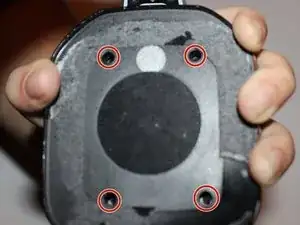
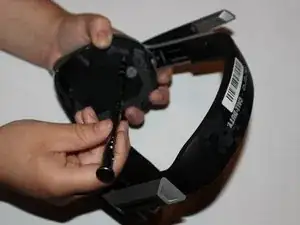
    • Remove the four 7mm screws with a Phillips #1 screwdriver.

    • You may want to use a 60mm screwdriver extension to reach the screws inside of the headset.

  6. wIYjpDDNFXneegVx
    wIYjpDDNFXneegVx
    QPoSKWJTBKl1jYcY
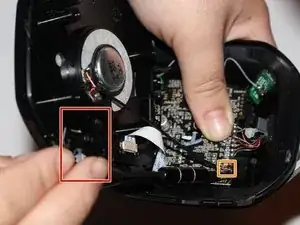
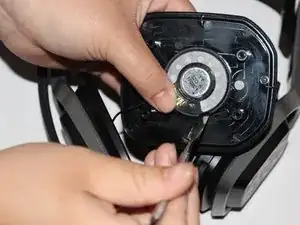
    • Lift the speaker area.

    • Disconnect the wires connected to the speaker.

    • Wedge a spudger on the edge of the speaker and lift upwards to remove the speaker from the device.

Conclusão

To reassemble your device, follow these instructions in reverse order.

Jasmine Yarbrough

Membro desde: 10/09/18

1017 Reputação

0 comentários