Background
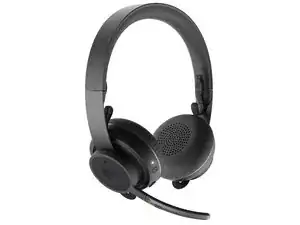
The Logitech Zone Wireless UC is a wireless, Unified Communications (UC)-optimized headset designed for office and remote work. It features a noise-canceling boom microphone, active noise reduction for the earcups, and multi-point wireless connectivity for desktop and mobile devices. Durable materials such as a reinforced metal headband and memory-foam leatherette earcups provide long-term comfort and resilience. The headset is compatible with Logitech configuration software (Logi Options+) for settings and firmware updates.
Identification
The Logitech Zone Wireless UC can be identified by the model number (M/N A00082). The model label is on the underside of an earcup; additional SKU or M/N markings may appear on the headband padding or the packaging. This label lists the model (M/N), part (P/N), and serial (S/N) numbers.
Specifications
- Form Factor: Over-ear wireless headset (UC-optimized)
- Connectivity: Bluetooth and USB (uses wireless dongle/USB adapter for PC connectivity in some SKUs; specifics vary by region)
- Bluetooth Version: Not specified on the provided Logitech support page
- Microphone: Noise-canceling boom microphone (hardware mute switch available)
- Drivers: Precision-tuned audio drivers (exact driver model not listed on support page)
- Noise Cancellation: Active noise reduction for headset; ANC specifics not provided in support content
- Battery: Rechargeable Li-ion (capacity and cell model not specified on the support page)
- Battery Life: Manufacturer-rated battery life varies by usage; exact hours not listed on the support page
- Materials: Reinforced metal headband, memory-foam earcups with leatherette covering (materials stated in product descriptions; support page does not give internal material specs)
- Model / Part Numbers: Not listed on the provided Logitech support page; model/region SKUs may be printed on the earcup label or product packaging
Troubleshooting
Common repair-relevant faults include connectivity/pairing failures, battery not charging or holding charge, and microphone audio dropouts. Diagnostic steps: re-pair or factory-reset the headset, ensure the battery is charged and test charging cable/port, verify firmware and settings via Logi Options+ (or re-install software), and test microphone on multiple devices to isolate hardware vs. software issues.
For additional troubleshooting help, visit: Visit support.logi.com for product support, downloads, and contact options; Logi Options+ is recommended for configuration and firmware updates.
Additional Information
Warranty Info
Warranty varies by region—check Logitech's warranty page for terms and to file a claim.