Background
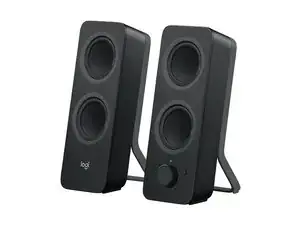
The Logitech Z207 are compact Bluetooth computer speakers designed for desk use, offering room‑filling stereo sound from a small footprint. Each speaker contains an active/powered driver and a passive radiator for enhanced bass, delivering 10 Watts peak / 5 Watts RMS per speaker. The design uses durable materials—sturdy ABS plastic housings and reinforced grilles—to withstand regular desktop use. Key features include Bluetooth multi‑device pairing with Logitech Easy‑Switch™, on‑speaker controls, and a compact, easy‑to‑place form factor.
Identification
The Logitech Z207 Bluetooth Computer Speakers can be identified by the model number (M/N S-00168). The model label is on the product label on the rear/underside of the primary/right speaker. This label lists the model (M/N), part (P/N), and serial (S/N) numbers.
Specifications
- Form Factor: Compact stereo desktop speakers (pair)
- Model / SKU / MPN: 980-001294 (Z207 Bluetooth Computer Speakers - Black)
- Power Output: 10 Watts Peak / 5 Watts RMS per speaker
- Drivers: Each speaker: active/powered driver + passive radiator for bass extension
- Connectivity: Bluetooth wireless (pair up to two devices, Logitech Easy-Switch™ for seamless switching)
- Channels: Stereo (left + right)
- On-device Controls: Play/pause and device switching controls located on the speaker
- Materials: Durable ABS plastic housings with reinforced grilles
- Product ID: z207-stereo-speakers-bluetooth
- Key switches: No mechanical key switches (not applicable)
Troubleshooting
Common faults include no power (check power cable/USB supply), no audio or intermittent sound (verify Bluetooth pairing, try a wired source if available, and check volume/mute), and distorted audio or rattling (inspect for damaged passive radiator or blown driver by testing with another device and listening for mechanical damage). Diagnostic steps: confirm power and connections, re‑pair Bluetooth, swap cables/devices, and open the enclosure to inspect driver wiring and passive radiator if needed.
For additional troubleshooting help, visit: Visit support.logi.com for product support, FAQs, and contact options.
Additional Information
Warranty Info
Refer to Logitech's warranty page for region-specific limited hardware warranty details.