Background
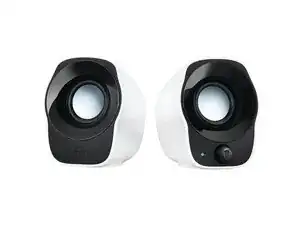
The Logitech Z120 Compact Stereo Speakers are USB-powered, compact desktop speakers designed for simple plug-and-play use with laptops and PCs. They feature a durable plastic housing and integrated cable-management to keep desks tidy. Key features include USB power (no external adapter), a 3.5 mm stereo input for broad compatibility, and easy-access volume/power controls on the right speaker. The design emphasizes portability and low-profile placement for small workspaces.
Identification
The Logitech Z120 Compact Stereo Speakers can be identified by the model number (M/N S00179). The model label is on the product label; the compact black pair has the right speaker containing the volume/power control and USB/3.5 mm cable. This label lists the model (M/N), part (P/N), and serial (S/N) numbers.
Specifications
- Manufacturer: Logitech
- Model / SKU / MPN: 980-000514 (Product ID: z120-compact-usb-speakers)
- Form Factor: Compact stereo desktop speakers (two-piece, wired)
- Power Source: USB powered (5 V via USB cable)
- Audio Input: 3.5 mm stereo mini-jack (wired)
- Connectivity: Wired USB for power and 3.5 mm analog for audio
- Controls: Integrated volume/power control on the right speaker
- Color / Finish: Black (as listed on product page)
- Materials: Durable plastic housing with molded cable-management
- Manufacturer Documentation: Product page and support articles on Logitech website (no spare parts listed on support page)
Troubleshooting
Common faults include no power (often due to a faulty USB cable or USB port), no audio (bad 3.5 mm cable, source settings, or failed volume control), and speaker distortion/rattling from damaged drivers. Diagnose by checking USB power on another port/device, verifying audio output and cable on a known-good source, swapping cables, and isolating which speaker is affected by listening to each independently.
For additional troubleshooting help, visit: Visit Logitech Support (support.logi.com) for product information, contact options, and region-specific assistance.
Additional Information
Warranty Info
Refer to Logitech's warranty page for region-specific limited warranty terms; warranty details are not specified on the product page.