Background
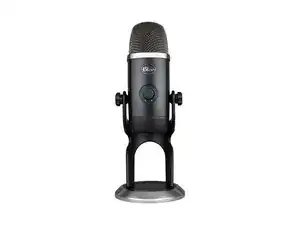
The YETI X is a USB condenser desktop microphone from Logitech/Blue aimed at streamers, podcasters, and content creators. It features a durable metal chassis and steel grille, offering robust build quality for desktop use. Key features include a four-capsule array with selectable polar patterns, onboard Blue VO!CE processing, a multi-function smart knob with LED metering, and zero-latency headphone monitoring. The World of Warcraft Edition applies themed cosmetic finishes to the standard YETI X hardware.
Identification
The Logitech YETI X can be identified by the model number (M/N A00148). The model label is on the underside near the USB connector. This label lists the model (M/N), part (P/N), and serial (S/N) numbers.
Specifications
- Form Factor: USB desktop condenser microphone (side-address)
- Capsule Configuration: Four condenser capsules (multi-capsule array)
- Polar Patterns: Cardioid, Omnidirectional, Bidirectional, Stereo
- Sample Rate / Bit Depth: Up to 48 kHz / 24-bit (USB)
- Connectivity: USB-C port on microphone; ships with detachable USB-C to USB-A cable (bus-powered)
- Onboard Controls: Multi-function smart knob with LED metering, mute button, pattern selector
- Headphone Output: 3.5 mm TRS jack for zero-latency monitoring (onboard headphone amp)
- Frequency Response: Approx. 20 Hz – 20 kHz (typical condenser microphone range)
- Materials: Metal chassis and steel grille (durable construction)
- Spare Parts Availability: No spare parts listed on the Logitech support page for the World of Warcraft Edition
- Key Switch: N/A (not a keyboard)
Troubleshooting
Common repair-relevant faults include no audio (USB/cable failure), intermittent connection or recognition by the host, mute/knob or LED ring failure, and headphone jack issues. Diagnose by testing with a known-good USB cable/port, checking OS audio device selection and levels, verifying functionality in Logitech G/Blue software, and visually inspecting the USB-C connector and internal solder joints if disassembly is required.
For additional troubleshooting help, visit: Visit https://support.logi.com for product support, troubleshooting articles, and contact options specific to your region.
Additional Information
Warranty Info
Warranty varies by region; consult Logitech support/warranty pages for the World of Warcraft Edition and register your product for warranty service.