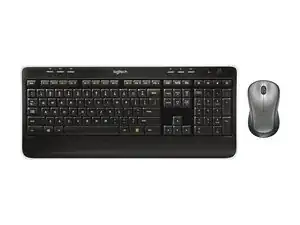
Background
The Wireless Combo MK520 is a full-size keyboard and contoured mouse combo from Logitech designed for everyday productivity. It uses a Logitech Unifying USB receiver for a reliable wireless connection and up to 10 meters of range, offering plug-and-play simplicity. The set is built from durable plastic materials with a contoured, full-size mouse and a full-sized keyboard intended for long-term daily use. Key features include a comfortable ergonomic mouse shape, full-size keys, and compatibility with Logitech Unifying-enabled receivers.
Identification
The Logitech Wireless Combo MK520 includes Keyboard (M/N Y-R0012), Mouse (M/N M-R0050) and USB receiver (M/N C-U0007). Model labels are located as follows — Keyboard: on the underside product label; Mouse: on the underside product label; USB Receiver: printed on the flat face or side of the receiver housing near the USB plug. Each component carries its own model (M/N) and serial (S/N) identifiers.
Specifications
- Form Factor: Full-size keyboard with full-size contoured right-handed mouse
- Model / SKU: Combo MPN / SKU 920-002553 (productID: mk520-wireless-keyboard-mouse)
- Connectivity: Logitech Unifying USB receiver (2.4 GHz proprietary wireless)
- Wireless Range: Up to 10 meters (per product page)
- Switch Type: Membrane / rubber-dome key mechanism (manufacturer not specified on product page)
- Key Switch Manufacturer: Not specified by Logitech on product page (rubber-dome membrane keyset)
- Mouse Type: Contoured full-size optical mouse (right-handed comfort design); specific mouse model not separately listed on product page)
- Battery Information: Not specified on product page (refer to underside label; typical Logitech combos use AA cells)
- In-box Items: Keyboard, contoured mouse, Logitech Unifying USB receiver, documentation (exact contents not detailed on product page)
- Carbon Footprint: Listed on product page as approximately 10.17 kg CO2e (packaging & product lifecycle metric)
Troubleshooting
Common repair-relevant faults include dead/weak batteries, lost or unpaired Unifying receiver, and sticky or non-responsive keys on the keyboard. Diagnose by replacing batteries, replugging or re-pairing the Unifying receiver (test on another USB port/PC), and visually inspecting/removing keycaps to check for debris or damaged membrane beneath. For mouse issues check optical sensor area for debris, test on another surface, and verify power/switches on the mouse.
For additional troubleshooting help, visit: Visit https://support.logi.com for product registration, support articles, and contact options.
Additional Information
Warranty Info
Refer to Logitech warranty information via support.logi.com; typical limited hardware warranty terms vary by region.