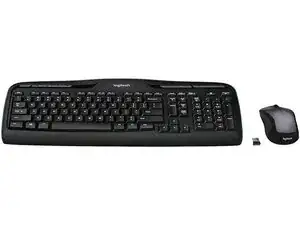
Background
The Wireless Desktop MK335 is a full-size keyboard-and-mouse bundle from Logitech designed for everyday office and home use. Its chassis uses durable ABS plastic and spill-resistant key tops to withstand regular typing and occasional accidents. Key features include a full numeric keypad, low-profile membrane keys for quiet typing, an ambidextrous wireless optical mouse, and a 2.4 GHz nano USB receiver for plug-and-play connectivity. The kit emphasizes long battery life and a simple, durable design for dependable daily use.
Identification
The Logitech WIRELESS DESKTOP MK335 can be identified by the model number (M/N M-R0050). The model label is on the underside of the keyboard and on the mouse label. This label lists the model (M/N), part (P/N), and serial (S/N) numbers.
Specifications
- Form Factor: Full-size keyboard with separate ambidextrous wireless optical mouse (desktop combo)
- Layout: Full QWERTY with separate numeric keypad
- Switch Type: Membrane (rubber-dome) low-profile keys
- Key Switch Manufacturer: Not specified by Logitech for this model (manufacturer not printed on support page)
- Connectivity: 2.4 GHz wireless via nano USB receiver (plug-and-play)
- USB Receiver: Nano 2.4 GHz USB receiver (Logitech proprietary; not explicitly listed as Unifying on support page)
- Power: Replaceable alkaline batteries for keyboard and mouse (exact cell counts not specified on provided support content)
- Battery Life (manufacturer rating): Manufacturer rates long battery life for everyday use (keyboard commonly advertised up to 36 months; mouse up to ~18 months depending on usage)
- Compatibility: Plug-and-play support for Windows and common desktop OSes; full feature support via Logitech software where available
- Materials: Durable ABS plastic chassis and spill-resistant key tops designed for extended daily use
Troubleshooting
Common repair-relevant faults include dead/unresponsive keys, mouse not tracking, and pairing issues with the USB receiver. Diagnose by swapping or removing batteries, toggling the device power/on-off switch, re-plugging or testing the USB receiver on another computer, and inspecting battery compartments and contacts for corrosion or loose connections.
For additional troubleshooting help, visit: Visit https://support.logi.com for drivers, downloads, and product support (search MK335 or Wireless Desktop).
Additional Information
Warranty Info
Logitech provides region-dependent limited hardware warranties (typically 1 year); check Logitech support/warranty pages for specifics.