Background
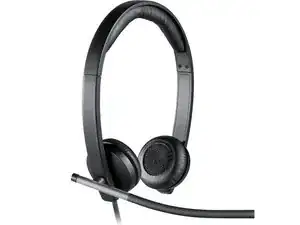
The USB Headset Mono H650e is a single-ear USB headset from Logitech designed for professional unified communications and call-center use. It features a noise-canceling boom microphone, on-cable or on-ear controls for call answer/end and volume, and plug-and-play USB connectivity for easy deployment. The design uses durable materials including a metal-reinforced headband and reinforced cable strain relief to withstand daily use. Key features include a flexible boom mic for clear voice pickup, single-ear monitoring for situational awareness, and compatibility with major operating systems.
Identification
The Logitech USB Headset Mono H650e can be identified by its model number (M/N A-00050). The model label is on the underside product label. The device’s serial number (S/N) appears nearby on the same label.
Specifications
- Manufacturer: Logitech
- Model: USB Headset Mono H650e
- Part Number(s): H650e (SKU and regional part numbers vary; check product label)
- Connectivity: Wired USB-A (plug-and-play; USB 2.0 compatible)
- Earpiece: Mono (single-ear) on-ear design with leatherette cushion
- Microphone: Noise-canceling unidirectional boom microphone (flexible boom)
- Controls: Inline or on-ear call answer/end, mute, and volume controls (location varies by SKU)
- Construction: Durable materials: metal-reinforced headband, reinforced cable strain relief and durable plastics
- Compatibility: Designed for unified communications; compatible with Windows and macOS via USB plug-and-play
- Cable: Fixed USB-A cable (length varies by SKU; check product label)
Troubleshooting
Common repair-relevant faults include no audio/output, microphone not detected, and cable or connector damage. Diagnose by testing the headset on a different USB port or computer, inspecting the cable and USB plug for visible damage, verifying mute/volume controls, and checking OS audio device settings. For intermittent audio, use a multimeter to check cable continuity and visually inspect solder joints at connector points.
For additional troubleshooting help, visit: Visit https://support.logi.com for product support, contact options, and guides.
Additional Information
Warranty Info
Refer to Logitech's warranty page for region-specific limited hardware warranty details and instructions to file a claim.