Parts
Logitech Parts
Background
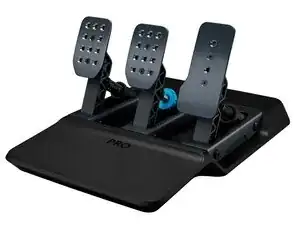
The PRO RACING PEDALS are a high-end sim-racing pedal set designed for competitive and enthusiast racing simulators. They are built from durable materials including stainless steel and machined aluminum and include adjustable pedal faces and a reinforced baseplate for stability. Key features include a load-cell brake, contactless (Hall-effect) sensors for throttle and clutch, and user-adjustable pedal travel and spring tension. The design emphasizes durability and precision for long-term, high-force use.
Identification
The Logitech PRO RACING PEDALS can be identified by the model number (M/N WU0010). The model label is on the underside of the pedal base. This label lists the model (M/N), part (P/N), and serial (S/N) numbers.
Specifications
- Form Factor: Three-pedal set (throttle, brake, clutch)
- Materials: Stainless steel pedal arms, machined/aluminium pedal faces and baseplate, reinforced steel mounting points
- Brake Sensor: Load-cell brake (force sensing) — model details not specified on support page
- Throttle & Clutch Sensors: Contactless Hall-effect position sensors (model details not specified on support page)
- Pedal Adjustability: Adjustable pedal face angle, spacing, and spring tension; adjustable pedal travel for brake and clutch
- Connectivity: USB connection to PC/console via supplied cable (host adapter required for some wheelbases)
- Mounting: Front and rear mounting points compatible with standard sim rigs; bolt-down holes on baseplate
- Footplate: Anti-slip textured pedal faces with optional replaceable faceplates
- Compatibility: Designed for major sim-racing wheelbases and PC/console platforms (see manufacturer compatibility list)
- Key Switch Manufacturer/Model: N/A (no keyboard-style key switches used in this device)
Troubleshooting
Common repair-relevant faults include unresponsive or noisy pedal sensors, inconsistent brake force readings from the load cell, and mechanical binding from worn bushings or debris. Diagnose by checking USB/cable continuity, recalibrating pedals in software, testing sensor outputs with a multimeter, and inspecting/cleaning pivot points and mounting hardware.
For additional troubleshooting help, visit: Visit Logitech Support for assistance, spare parts availability, and compatibility information: https://support.logi.com/hc/en-us/articl...
Additional Information
Warranty Info
Refer to Logitech's warranty page for region-specific limited hardware warranty terms and how to file a claim.