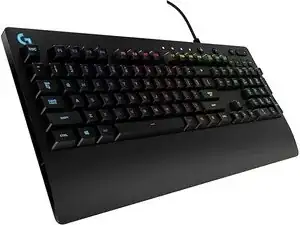
Background
The PRODIGY COMBO pairs Logitech's G213 Prodigy wired gaming keyboard with the G231 Prodigy gaming headset to provide an affordable entry-level gaming bundle. The keyboard features LIGHTSYNC RGB backlit keys, dedicated multimedia controls, customizable key functions, and a spill-resistant top case built from durable plastics. The headset is a lightweight, wired gaming headset from the Prodigy family designed for extended use with breathable earcup materials and a reinforced, adjustable headband. Both components use durable materials and wired connections aimed at reliability and everyday gaming use.
Identification
The Logitech PRODIGY COMBO includes Keyboard (M/N M-U0049), Mouse (M/N Y-U0029) and USB receiver. Model labels are located as follows — Keyboard: on the underside product label; Mouse: on the underside product label; USB Receiver: printed on the flat face or side of the receiver housing near the USB plug. Each component carries its own model (M/N) and serial (S/N) identifiers.
Specifications
- Components: Keyboard (Logitech G213 Prodigy), Headset (Logitech G231 Prodigy)
- Keyboard Model Number: G213 Prodigy
- Headset Model Number: G231 Prodigy
- Switch Type: Logitech proprietary Mech‑Dome membrane keys (proprietary membrane dome switches, not mechanical)
- Illumination: LIGHTSYNC RGB backlit keys
- Spill Resistance: Spill‑resistant top case (keyboard)
- Connectivity: Keyboard: Wired USB (bus powered); Headset: Wired analog (3.5 mm wired connection)
- Multimedia Controls: Dedicated multimedia keys on the keyboard
- Construction Materials: Durable ABS/plastic keyboard chassis and reinforced adjustable headset headband with breathable earcup materials
- Power: Keyboard is USB bus‑powered; headset is passive (no battery)
- Compatibility: Designed for PC gaming; plug‑and‑play with standard audio/USB ports (software optional via Logitech support)
Troubleshooting
Common repair‑relevant faults include sticky or non‑responsive keys after spills, RGB/backlight failures, and headset audio or microphone dropouts—start diagnostics by testing the keyboard and headset on a different USB/aux port and another PC. Inspect cables and connectors for breaks or bent pins, check for visible liquid residue or corrosion, and verify software/driver recognition in the OS. For physical cable or PCB damage, open the housing to inspect solder joints and cable strain reliefs; replace or resolder damaged cables or connectors as needed.
For additional troubleshooting help, visit: Contact Logitech Support (support.logi.com) for product support, drivers, and downloads for G213/G231 Prodigy products.
Additional Information
Warranty Info
Refer to Logitech's region‑specific limited hardware warranty for coverage details; warranty information is available on Logitech's support/warranty pages.