Background
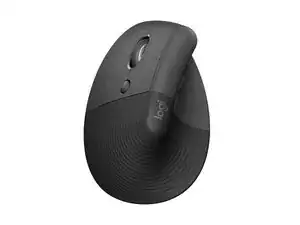
The Logitech Lift Vertical Ergonomic Mouse (Left) is a compact, vertical ergonomic mouse designed to promote a more natural handshake posture for small to medium hands. It is offered in three colors and includes a left-handed option to better fit left-hand users. The housing incorporates recycled plastics and other durable materials to improve sustainability and longevity. Key features include a vertical form factor for reduced wrist strain and wireless connectivity for flexible use.
Identification
The Logitech Lift Vertical Ergonomic Mouse LEFT includes Mouse (M/N MR0094) and USB receiver (M/N CU0021). Model labels are located as follows — Mouse: on the underside product label; USB Receiver: printed on the flat face or side of the receiver housing near the USB plug. Each component carries its own model (M/N) and serial (S/N) identifiers.
Specifications
- Form Factor: Vertical ergonomic mouse, small-to-medium hand size, left-handed variant
- Model / SKUs: MPN/SKU values listed on product page: 910-006467, 910-006466, 910-006472, 910-006469
- Colors: Graphite, Rose, Off-white
- Materials: Housing made with recycled plastics and durable materials (manufacturer emphasizes sustainability and recycled content)
- Connectivity: Wireless (Bluetooth Low Energy; compatible with Logi Bolt USB receiver — product page lists wireless category)
- Power / Battery: User-replaceable battery (manufacturer-stated details not specified on scraped page)
- Optical Sensor: High-precision optical sensor (specific sensor model/manufacturer not specified by Logitech on scraped page)
- Primary Switches: Not specified by manufacturer on the product page (microswitch manufacturer/model not listed)
- Compatibility / Software: Works with Logitech software (Logi Options+/Logi Bolt support referenced via support pages)
- Environmental / Footprint: Product carbon footprint example listed: 3.56 kg CO2 (per product page sustainability data)
Troubleshooting
Common repair-relevant faults include failing primary click switches (double-click), intermittent wireless connectivity, and degraded glide pads or dirty optical sensor. Diagnose by re-pairing or testing with a known-good receiver, swapping/renewing the battery, cleaning the sensor and glide areas, and opening the shell to inspect/measure switch continuity if double-clicking occurs.
For additional troubleshooting help, visit: Visit support.logi.com for drivers, replacement parts, and troubleshooting guides.
Additional Information
Warranty Info
Limited hardware warranty; duration varies by region (typically 1–2 years). Check Logitech support for exact terms.