Background
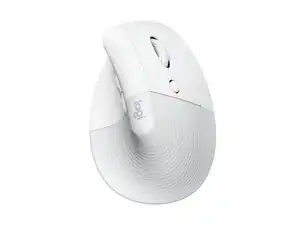
The Logitech Lift for Mac is a vertical ergonomic mouse designed specifically for macOS users and small-to-medium hands. It places the hand at an approximate 57° angle to promote a natural handshake position, reducing wrist strain during extended use. The housing is built with durable materials including recycled plastics and soft-touch grip surfaces to balance longevity and comfort. Key features include a compact ergonomic form, Mac-oriented compatibility and support via Logi Options+.
Identification
The Logitech Lift Vertical Ergonomic Mouse FOR MAC can be identified by the model number (M/N MR0094). The model label is on the underside of the mouse. This label lists the model (M/N), part (P/N), and serial (S/N) numbers.
Specifications
- Form Factor: Vertical ergonomic mouse (approx. 57° handshake angle)
- Model / SKU / MPN: 910-006471
- Color: Off-white
- Materials: Made with recycled plastic and soft-touch grip surfaces (durable plastics)
- Carbon Footprint: 3.073 kg CO2e (per product listing)
- Compatibility: Designed for Mac (macOS); optimized layout and functionality for Mac users
- Connectivity: Wireless (Bluetooth); configurable with Logi Options+ (per support guidance)
- Battery: Not specified on product page (user-replaceable battery type not disclosed in provided content)
- Optical Sensor: Optical tracking; exact sensor model not disclosed by Logitech in provided content
- Primary Switches: Manufacturer and model of internal microswitches not disclosed by Logitech in provided content
- Target Hand Size: Designed for small to medium hands
Troubleshooting
Common repair-relevant faults include loss of wireless connection, poor tracking, worn/unstable click switches, and scroll-wheel issues. Basic diagnostics: replace or test with a fresh battery, re-pair Bluetooth and check Logi Options+, clean the optical sensor and scroll mechanism, and open the housing to visually inspect or test button switch continuity.
For additional troubleshooting help, visit: Visit https://support.logi.com for product support, troubleshooting articles, and contact options; Logi Options+ is recommended for configuration.
Additional Information
Warranty Info
Warranty varies by region; see Logitech's warranty page for details and to file claims.