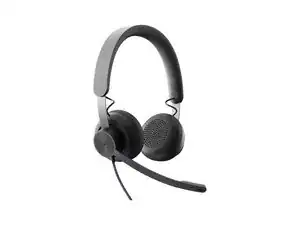
Background
The LOGI ZONE 750 is a lightweight, wired USB over-ear headset designed for professional calls and immersive audio. It uses premium audio drivers and features passive noise cancellation for the ear cups plus a noise-canceling, flip-to-mute boom microphone for clear voice capture. The design emphasizes durable materials and sustainability across components and processes while keeping the headset comfortable for all-day use. Simple inline controls and a USB connection make it suitable for typical office and remote-work setups.
Identification
The Logitech LOGI ZONE 750 can be identified by the model number (M/N A00100). The model label is on the headset housing and the included cable/connector housing. This label lists the model (M/N), part (P/N), and serial (S/N) numbers.
Specifications
- Form Factor: Lightweight over-ear closed-back wired USB headset
- Connectivity: Wired USB (Zone 750 wired USB model/productID: zone-750-wired-usb)
- Drivers: Premium audio drivers (manufacturer/model not specified on product page)
- Microphone: Noise-canceling boom microphone with flip-to-mute functionality; passive noise cancellation for ear cups
- Model / SKU / MPN: Zone 750 - Graphite, SKU/MPN: 981-001103
- Colors: Graphite (other color availability varies by region)
- In the Box: Zone 750 headset, USB/receiver cable (as shown in product images), documentation
- Materials: Constructed with durable materials; Logitech lists a Materials & Sustainability section for the product
- Compatibility: Designed for USB-equipped computers and unified communications; exact platform integrations vary
- Category: Logi Headsets — business/UC headset
- Product Page / Listing: Product URL identifier: https://www.logitech.com/en-us/shop/p/zo...
Troubleshooting
Common faults include no audio (often caused by USB port or cable failure), microphone not detected (muted flip-to-mute or system settings), and damaged cable/connector. Diagnose by checking flip-to-mute position and system audio settings, trying alternate USB ports/devices, inspecting the cable for physical damage, and swapping the USB cable if available.
For additional troubleshooting help, visit: Visit https://support.logi.com for product support, warranty queries, and contact options.
Additional Information
Warranty Info
Refer to Logitech's warranty page for region-specific limited hardware warranty information; warranty terms vary by country and retailer.