Background
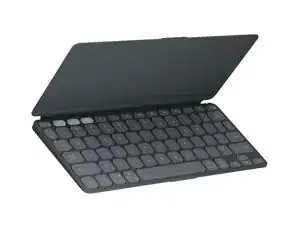
The Keys-To-Go 2 is an ultra-slim, portable tablet keyboard from Logitech designed for on-the-go typing across tablets, phones, and laptops. It features roomy, comfortable low-profile keys in a compact footprint and a built-in cover to protect the keys during transport. The chassis is made with recycled plastic and engineered for durability, offering a lightweight yet robust surface for frequent mobile use. Key features include universal Bluetooth connectivity, a slim light design, and long battery life as promoted by the manufacturer.
Identification
The Logitech Keys-To-Go 2 can be identified by the model number (M/N YR0100). The model label is on the underside of the keyboard. This label lists the model (M/N), part (P/N), and serial (S/N) numbers.
Specifications
- Form Factor: Ultra-slim portable tablet keyboard (built-in cover)
- Layout: Compact full-size layout with roomy low-profile keys (English US QWERTY variants)
- Switch Type: Low-profile scissor-style membrane keys (manufacturer does not disclose discrete mechanical switch model)
- Key Switch Manufacturer/Model: Not disclosed by Logitech
- Connectivity: Bluetooth (universal compatibility with Android, Chrome OS, Windows, iPadOS/iOS, macOS)
- Materials: Chassis made with recycled plastic; slim fabric-like top and protective built-in cover
- Model / SKU / MPN: 920-012867 (Graphite), 920-012919 (Pale Gray), 920-012920 (Lilac)
- Battery: Manufacturer lists long battery life; specific battery chemistry and capacity not disclosed
- Backlighting: Not listed (no backlight specified on product page)
- Weight & Dimensions: Compact, lightweight design; exact dimensions/weight not specified on product page
Troubleshooting
Common repair-relevant faults are Bluetooth pairing failures, unresponsive or sticky keys from debris or membrane wear, and battery/charging failures. Diagnose by testing pairing on a second device, verifying the power switch and Bluetooth status, inspecting and cleaning the key surface, and checking battery function (power on/off and charging indicator).
For additional troubleshooting help, visit: Visit https://support.logi.com for product support, registration, and contact options.
Additional Information
Warranty Info
Warranty varies by region; check Logitech's warranty page (link above) for specific limited hardware warranty terms.