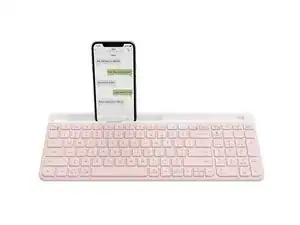
Background
The K580 Slim Multi-Device Wireless Keyboard is a low-profile, multi-device wireless keyboard designed for tidy desk setups and seamless switching between devices using Easy-Switch. The design emphasizes a slim profile and minimalist key layout while being made with recycled plastic and other durable materials for long-term use. Key features highlighted on the product page include multi-device pairing, a slim modern aesthetic, and availability in multiple colors (Rose, Off-white, Graphite). The product targets productivity users seeking a compact, wireless typing solution.
Identification
The Logitech K580 can be identified by the model number (M/N YR0074). The model label is on the product label on the underside (examples: 920-011329, 920-009211, 920-009210). This label lists the model (M/N), part (P/N), and serial (S/N) numbers.
Specifications
- Form Factor: Slim, low-profile keyboard (compact full-layout, minimalist design)
- Switch Type: Low-profile scissor (membrane) key mechanism — manufacturer/model not specified on product page
- Connectivity: Multi-device wireless with Easy-Switch (pair and switch between devices)
- Model numbers (SKUs / MPNs): 920-011329 (Rose, MPN 920-011329); 920-009211 (Off-white, MPN 920-009211); 920-009210 (Graphite, MPN 920-009210)
- Colors: Rose, Off-white, Graphite
- Category: Keyboards
- Materials: Made with recycled plastic; designed with durable materials for long-term use (housing and key assembly per product sustainability notes)
- Layout: English US (QWERTY)
- Power / Battery: Battery-powered (specific battery type and capacity not specified on the product page)
- Environmental footprint: Carbon footprint listed on product page: 6.43 kg CO2e
Troubleshooting
Common repair-relevant faults include unresponsive or intermittently working keys, physical keycap damage, and wireless connectivity/pairing failures. Diagnose by testing with fresh batteries, re-pairing via Easy-Switch, removing keycaps to inspect the scissor mechanisms for debris or broken clips, and using a multimeter to check battery contacts or PCB traces if power issues persist.
For additional troubleshooting help, visit: Visit Logitech Support for product help and contact options: https://support.logi.com/hc/en-us/articl...
Additional Information
Warranty Info
Refer to Logitech warranty pages for regional warranty terms; product page and support site provide warranty claim links.