Background
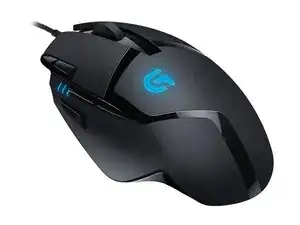
The G402 Hyperion Fury is a wired FPS gaming mouse from Logitech designed for high-speed tracking and responsive performance. It uses Logitech's Fusion Engine hybrid sensor technology to deliver very fast tracking for competitive play and includes on-board memory for profile storage. The shell is built from durable plastics with reinforced areas at common stress points and durable micro-switches beneath the primary buttons to withstand heavy use. Key features include multiple programmable buttons, an ergonomic right-handed shape, and a high polling rate for low-latency input.
Identification
The Logitech G402 Hyperion Fury can be identified by the model number (M/N M-U0041). The model label is on the underside of the mouse and the Logitech/G logo on the palm rest. This label lists the model (M/N), part (P/N), and serial (S/N) numbers.
Specifications
- Form Factor: Wired, right-handed ergonomic FPS gaming mouse
- Sensor: Logitech Fusion Engine hybrid optical sensor (high-speed tracking, marketed up to ~500 IPS)
- DPI: User-adjustable (marketing up to 4000 DPI)
- Polling Rate: 1000 Hz (1 ms)
- Buttons: 8 programmable buttons (including two side buttons and a high-speed primary button set)
- Primary Switches: Omron-style micro switches (manufacturer commonly used by Logitech; exact model not listed on the support page)
- On-board Memory: Yes — stores profiles on the mouse
- Connectivity: USB wired (standard USB-A)
- Cable: Rubber-coated USB cable (approx. 1.8 m)
- Dimensions: Approx. 131 mm (L) x 75 mm (W) x 41 mm (H)
- Weight: Approx. 108 g (mouse only, manufacturer value may vary by measurement method)
Troubleshooting
Common repair-relevant faults include worn or intermittent primary button clicks (caused by micro-switch wear), cable damage/interruptions, and erratic sensor tracking. Diagnose by testing the mouse on a different USB port/PC and swapping cables, inspecting the cable for visible damage, checking on-board profiles/software, then opening the shell to continuity-test or replace the micro-switches or repair the cable.
For additional troubleshooting help, visit: Visit https://support.logi.com for product support and troubleshooting articles specific to the G402.
Additional Information
Warranty Info
Limited hardware warranty varies by region; check Logitech's warranty page linked from support.logi.com for terms and claim procedures.